RoboPack
Overview
The Robopack system is a specialized automated printing station designed for printing EIFS (Exterior Insulation and Finish System) product labels directly onto bags. This feature integrates with the Print Maestro printer system to automatically print stickers for EIFS bags with specific customer information, dimensions, lot numbers, and product specifications.
Purpose
Robopack streamlines the EIFS bag labeling process by:
- Automating label printing for EIFS production jobs
- Creating EIFS bag inventory automatically upon successful print job submission
- Tracking print jobs to enable reprinting if labels are damaged or misprinted
- Managing multiple bag specifications including bag type, size (with fractional sizes), drainage options, and pieces per bag
- Reducing manual entry errors through structured data validation and editable tables
Key Features
- Job Selection Interface - Users select from active EIFS jobs in progress, filtered by sales order, customer, and lot number
- Interactive Print Table - Tabulator-based editable table allowing operators to specify:
- Quantity of bags to print
- Product type (EPS or GPS)
- Bag type selection from available inventory
- Size specifications (whole numbers and fractional inches)
- Pieces per bag count
- Drainage designation (yes/no checkbox)
- Real-time Progress Tracking - Dashboard cards display total bags printed vs. target quantities for each bag type
- Print Job Management - Each row can be printed individually, with the ability to resend failed or damaged labels
- Automatic Inventory Management - System automatically removes stickers and bags from inventory upon successful print job creation
Access Requirements
Access to the Robopack system is restricted to users who are logged in and have appropriate production floor permissions. The system is accessed from the home page via navigation to specific EIFS jobs.
Workflow Overview
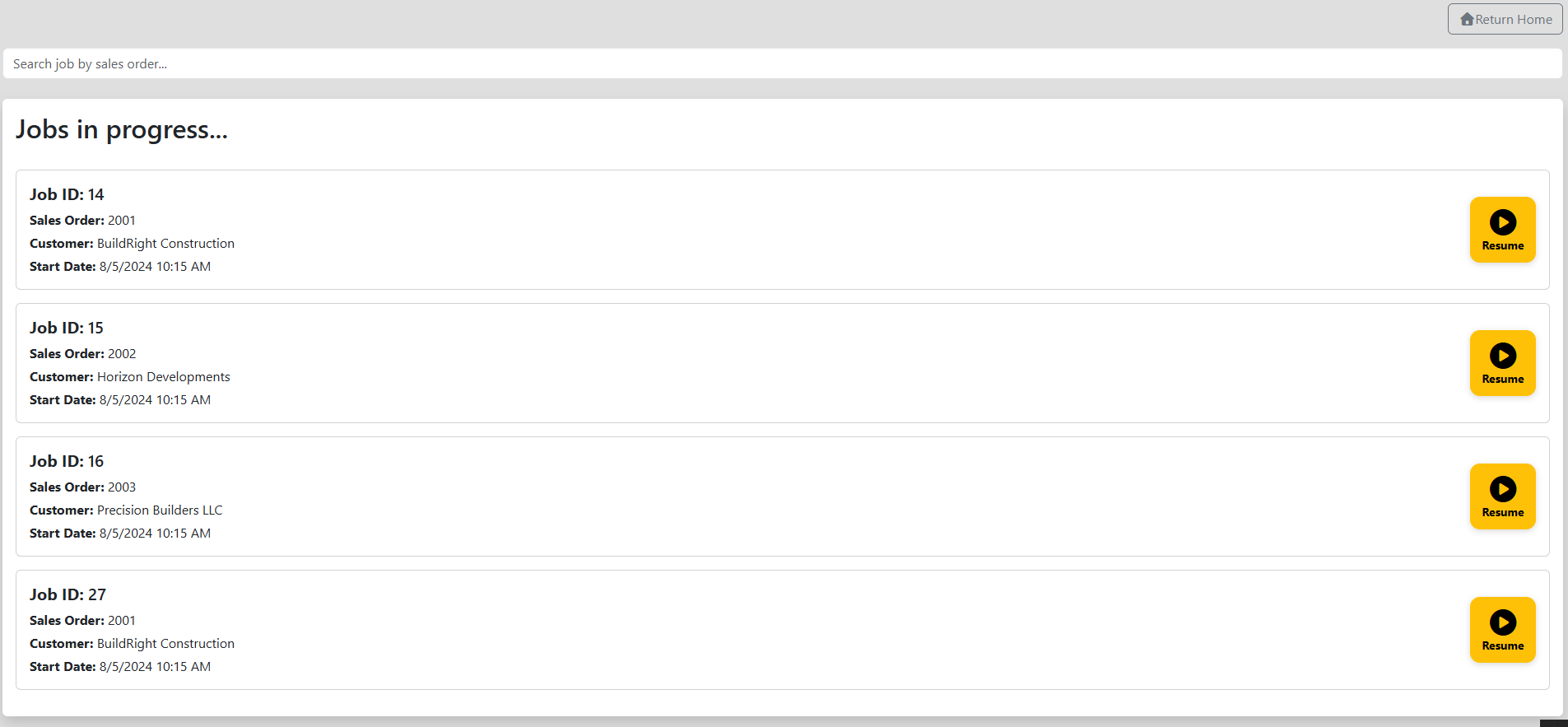
- User navigates to Robopack Jobs page (
/robopack/jobs) - System displays all active EIFS jobs that are in progress (not yet completed)
- User selects a job to begin printing labels
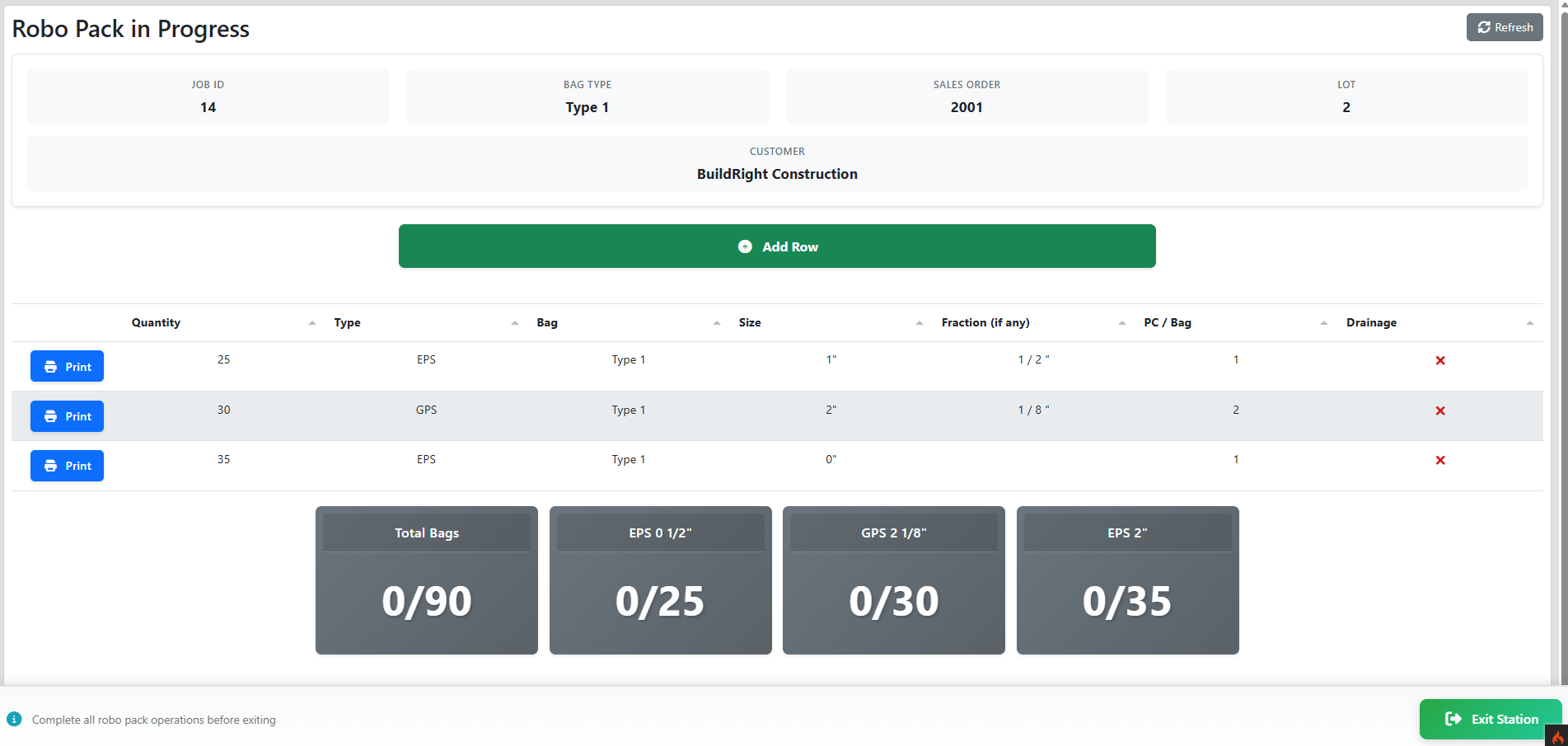
- System displays the Robo Pack In Progress page with:
- Job information (sales order, customer, lot number)
- Editable table for specifying print specifications
- Progress cards showing printed quantity vs. target quantity
- User fills in print specifications for each bag size/type needed
- User clicks Print button for each row
- System validates the data, creates EIFS bags in the database, removes inventory, and sends the print job to Print Maestro
- Labels print at the Robopack station
- User can resend labels if needed or exit the station when complete
![INSERT IMAGE HERE: Screenshot of the Robopack Jobs page showing available EIFS jobs with job IDs, sales orders, customers, and start dates]
![INSERT IMAGE HERE: Screenshot of the Robo Pack In Progress page showing the editable table, progress cards, and print buttons]
Note: The Robopack feature occasionally experiences issues where table rows do not populate correctly. A Refresh Page button is provided in the top-right corner to reload the data if this occurs.
Front-End Behavior
Page 1: Robopack Jobs (/robopack/jobs)
File Location: src/app/Views/robopack/robo_pack_jobs.php
Page Layout
The jobs selection page provides a simple interface for choosing which EIFS job to work on:
Header Section:
- Go Back button (top-left) - Returns to
/user/view(home page) - Search bar - "Search job by sales order..." with real-time filtering
Jobs Display:
- White card-based layout with shadow effect
- Header: "Jobs in progress..."
- Each job card displays:
- Job ID
- Sales Order number
- Customer name
- Start Date (formatted as
M/D/YYYY h:mm A) - Start Job button (blue, right-aligned)
Empty State:
- If no EIFS jobs are in progress: "No EIFS jobs are in progress at this time."
![INSERT IMAGE HERE: Screenshot showing the Robopack Jobs page with multiple job cards, each displaying job details and a Start Job button]
Interactive Elements
Search Functionality:
- Real-time search using
search_jobs()function - Filters job cards by sales order number
- Uses jQuery to show/hide cards based on search input
- Each card has ID:
sales_order_\{sales_order_label\}
Job Card Click:
- Clicking Start Job button navigates to
/robopack/in_progress/\{job_id\} - Loads the in-progress page for the selected job
Page 2: Robo Pack In Progress (/robopack/in_progress/\{job_id\})
File Location: src/app/Views/robopack/robo_pack_in_progress.php
JavaScript: src/public/js/robopack/robo_pack_in_progress.js
CSS: src/public/css/eifs/robo_pack_in_progress.css
Page Layout
Header Section:
- Title: "Robo Pack in Progress" (h2)
- Refresh Page button (top-right) - Reloads the entire page to fix table population issues
- Toast notification container (top-right) for alerts
Job Information Table:
A bordered table displays current job details (some columns hidden with d-none class):
| Column | Visible | Content |
|---|---|---|
| Job ID | No | Hidden (used by JavaScript) |
| EIFS Job ID | No | Hidden (used by JavaScript) |
| Bag Type | Yes | EIFS bag type label |
| Sales Order | Yes | Sales order number |
| Customer | Yes | Customer name |
| Lot | Yes | Lot number |
Action Buttons:
- Add Row button (blue outline) - Adds a new empty row to the print table
Print Specifications Table:
The main interactive table (#robo_pack_table) built with Tabulator.js:
| Column | Type | Behavior |
|---|---|---|
| Print Button | Action | "Print" (blue) or "Resend" (yellow) button |
| Quantity | Number | Editable, min: 0, required |
| Type | Dropdown | EPS or GPS selection, required |
| Bag | Dropdown | List of available bag types for job type 7 |
| Size | Number | Whole number size in inches, min: 0, required |
| Fraction (if any) | Modal Trigger | Click to open fraction editor modal |
| PC / Bag | Number | Pieces per bag count, min: 0, required |
| Drainage | Checkbox | Tick/cross formatter, toggles drainage designation |
Table Row Coloring:
- Green background (
rgba(125,255,99,0.54)) - Row has been printed successfully (done === 1) - White background - Row not yet printed or pending
Progress Cards: Bottom section displays real-time progress tracking cards:
-
Total Bags Card:
- Header: "Total Bags"
- Display:
\{printed\}/\{target\}in 50px font - Background: Gray (
bg-secondary) initially - Changes to green (
bg-success) when target met
-
Individual Bag Type Cards:
- One card per EIFS bag type target
- Header: Bag type label (e.g., "2x4x8 EPS")
- Display:
\{printed\}/\{target\}for that specific type - Background: Gray initially, green when target met
- Cards generated dynamically from
$targetsarray - Only shows bag types with
quantity > 0
Exit Button:
- Exit Robo Pack Station button (blue) - Returns to
/robopack/jobs
![INSERT IMAGE HERE: Close-up of the editable Tabulator print table showing columns for Quantity, Type, Bag, Size, Fraction, PC/Bag, and Drainage with both Print and Resend buttons]
![INSERT IMAGE HERE: Progress cards section showing the Total Bags card and individual bag type cards with printed/target counts]
Interactive Elements
1. Loading States:
The table uses a loading overlay during AJAX operations:
.loader-overlay {
position: absolute;
background: rgba(255, 255, 255, 0.7);
display: flex;
justify-content: center;
align-items: center;
z-index: 100;
}
- Shows spinner icon during data loading
- Appears when fetching print job info
- Automatically removed on success/error
2. Table Editing:
Type Selection:
- Dropdown with "EPS" or "GPS" options
- On change:
- Sets
label_nameto "LotStickerGPS" or "LotStickerEPS" - Resets fraction data
- Resets drainage flag
- Redraws table
- Sets
Bag Type Selection:
- Populated from API call to
/api/bag/get_typeswithjob_type_id: 7 - Lists all available bag type labels
- Allows custom bag entry
Size Input:
- Numeric input for whole inches
- Displays with
"suffix in table - Combined with fraction for total size
Fraction Editor:
- Click "Fraction" cell to open modal
- Modal contains:
- Numerator input (top)
- Visual divider line
- Denominator input (bottom)
- Cancel button (gray)
- Remove Fraction button (red) - Clears fraction data
- Save Fraction button (blue) - Saves and updates label name
Validation:
- Numerator and denominator must be > 0
- Displays as
\{numerator\}/\{denominator\}" in table - Updates
label_nameto include "Frac" suffix (e.g., "LotStickerEPSFrac")
Drainage Checkbox:
- Visual tick/cross formatter
- Click to toggle between true/false
- When true, appends "DB" to label name
3. Print Job Workflow:
Initial Print:
- User fills in row data
- Clicks Print button
- Button becomes disabled with text "Printing..."
- JavaScript validates data via
validate_print_job():- All PC/Bag, Quantity, and Size values must be > 0
- Type must be selected
- Calculates total print size:
size_value + (numerator / denominator)
- System shows "Sending..." notification
- Calls
post_print_job()withresend: 0 - On success:
- Button changes to yellow Resend button
- Row background turns green
- Notification: "Successfully sent order to printer"
- Progress cards update via
update_eifs_targets()
- On error:
- Shows API error notification
- Button re-enables
Resend Print Job:
- User clicks Resend button
- System calls
show_resend_modal()with row position - Modal displays current row data in read-only table:
- Quantity, Type, Bag, Size, Fraction, PC/Bag, Drainage
- User clicks Resend Job button in modal
- System validates and calls
post_print_job()withresend: 1 - Modal closes and print job re-submits
4. Progress Card Updates:
Function update_eifs_targets(job_id) polls /api/eifs_bag/get_job_totals:
- Updates
#total_\{bag_type_id\}with current count - Updates
#totalwith overall count - Compares printed vs. target:
- If
printed >= target: Changes card to green (bg-success) - If
printed < target: Keeps gray (bg-secondary)
- If
- Called after each successful print job
5. Add Row Functionality:
- Add Row button calls
add_table_row() - Adds new empty row to Tabulator table
- User can fill in specifications for additional print jobs
- Allows printing multiple label types for same job
6. Refresh Page:
- Top-right Refresh Page button uses
window.location.reload() - Workaround for occasional table population issues
- Reloads entire page with fresh data from server
User Experience Notes
Visual Feedback:
- Notifications appear in top-right corner (toast style)
- Color coding (green = complete, gray = in progress)
- Button state changes (Print → Printing... → Resend)
- Row highlighting for completed prints
Error Handling:
- Validation messages via
$.notify()notifications - API errors displayed with details
- Prevents invalid data submission
- User-friendly error messages
Responsive Design:
- Table uses
layout: "fitColumns"to adapt to screen width - Progress cards use flexbox layout
- Cards stack on smaller screens
![INSERT IMAGE HERE: Screenshot of the Fraction Editor modal showing numerator and denominator inputs with Cancel, Remove Fraction, and Save Fraction buttons]
![INSERT IMAGE HERE: Screenshot of the Resend Job modal displaying a previously printed job's details in a read-only table]
Back-End Logic
Controller: Robopack
File Location: src/app/Controllers/Robopack.php
The Robopack controller manages the two main pages for the Robopack printing station.
Method: jobs()
Route: /robopack/jobs
Displays the job selection page showing all active EIFS jobs.
public function jobs(): string
{
$title['title'] = "Robo Pack";
$data['jobs'] = Job_model::has('eifs_jobs')->where('finish', NULL)
->with('eifs_jobs.sales_order')->get();
$data['warning'] = json_encode($_SESSION);
return view('templates/header', $title) .
view('robopack/robo_pack_jobs', $data) .
view('templates/footer');
}
Logic:
- Queries
jobtable for jobs with associatedeifs_jobsrecords - Filters to only incomplete jobs (
finishisNULL) - Eager loads
eifs_jobs.sales_orderrelationship for display - Passes jobs array to view for rendering
- Returns rendered view with header and footer
Method: in_progress(int $job_id)
Route: /robopack/in_progress/\{job_id\}
Displays the main Robopack printing interface for a specific EIFS job.
public function in_progress(int $job_id): string|RedirectResponse
{
$this->validation->setRule("job_id", "Job ID",
"required|numeric|is_not_unique[job.id]");
if(!$this->validation->run(['job_id' => $job_id])) {
log_message("error", __CLASS__ . "::" . __FUNCTION__ .
"() - Validation errors: " .
json_encode($this->validation->getErrors(), JSON_PRETTY_PRINT));
return redirect()->back()->withInput()
->with('errors', $this->validation->getErrors());
}
$job = Job_model::with('eifs_job')->find($job_id);
if($job['finish'] !== NULL) {
log_message('warning', 'Attempted to start a ROBOPACK/EIFS job with ID : '
. $job_id . ' that was already complete');
return redirect()->with("messages",
["Robopack job with ID" . $job_id . " already complete"])
->to('/robopack/jobs');
}
else {
$data['user'] = auth()->user();
$data['job'] = $job;
$data['target_total'] = Eifs_bag_target_model::getJobTargetTotal($job_id);
$data['targets'] = Eifs_bag_target_model::with('eifs_bag_type')
->where('job_id', $job_id)
->where('quantity', '>', 0)->get();
$title['title'] = "Robo Pack In Progress";
return view('templates/header', $title) .
view('robopack/robo_pack_in_progress', $data) .
view('templates/footer');
}
}
Logic:
- Validates job_id parameter exists in database
- Loads job with EIFS job relationship from database
- Checks if job is already complete:
- If
finishis not NULL, redirects back to jobs page with warning - Logs warning message about attempted access to completed job
- If
- Prepares data for view:
- Current authenticated user
- Job record with EIFS job details
- Total target quantity across all bag types
- Individual targets for each EIFS bag type (only where quantity > 0)
- Returns rendered view with data
API Controller: PrintJob
File Location: src/app/Controllers/Api/PrintJob.php
The PrintJob API controller handles the creation and management of print jobs sent to the Print Maestro system.
Method: send()
Route: /api/print_job/send (POST)
Creates a single print job for Robopack printing and manages associated EIFS bag creation.
Validation Rules:
'resend' => 'required|numeric|in_list[0,1]'
'size_value' => 'required|numeric|greater_than_equal_to[0]'
'size_numerator' => 'required|numeric|greater_than_equal_to[0]'
'size_denominator' => 'required|numeric|greater_than_equal_to[0]'
'quantity' => 'required|numeric|greater_than[0]'
'job_id' => 'required|numeric|is_not_unique[job.id]'
'label_name' => 'required|alpha_numeric_punct|max_length[255]'
'type' => 'required|string|in_list[eps,EPS,gps,GPS]'
'bag_type' => 'required|alpha_numeric_punct|min_length[2]|max_length[255]'
'is_drainage' => 'required|alpha|in_list[true,false]'
Processing Flow:
-
Validate Input - Ensures all required parameters are present and valid
-
Load Job Data:
$job = Job_model::with('eifs_job')->find($valid_data['job_id']); -
Find EIFS Bag Type ID:
$eifs_bag_type_id = find_eifs_bag_type(
$valid_data['size_value'],
$valid_data['size_numerator'],
$valid_data['size_denominator'],
$valid_data['type']
);- Constructs label like "EPS 2 1/2"" or "GPS 4""
- Searches
eifs_bag_typetable for matching record - Returns
-1if not found (triggers error response)
-
Handle Resend (if
resend === 1):delete_previous_print_job($valid_data, $job->eifs_job->id, $eifs_bag_type->id);- Deletes the old print job record to avoid duplicates
-
Find EIFS Block:
$eifs_block_id = find_eifs_block_id($job->id, $eifs_bag_type_id);- Searches for an EIFS block of matching type with < 12 bags already made
- Returns
-1if no suitable block found (creates notification)
-
Calculate Totals:
- Type Total: Sum of
quantityfromeifs_bag_targetfor this specific bag type - Job Total: Sum of all
quantityvalues across all bag types for this job - Starting Number: Count of previously printed labels for this specific size + 1
- Job Count: Total number of labels printed so far on entire job
- Type Total: Sum of
-
Create EIFS Bags:
make_eifs_bags(
$valid_data['bag_type'],
$valid_data['quantity'],
$valid_data['job_id'],
$eifs_bag_type->id,
$eifs_block_id
);- Creates
quantitynumber ofeifs_bagrecords - Associates each bag with:
- EIFS bag type
- Bag type (for packaging)
- EIFS block (if found)
- Job ID
- Removes stickers and bags from inventory
- Logs inventory removal
- Creates
-
Create Print Job Record:
$print_job = new Print_job_model();
$print_job->fill($valid_data);
if ($valid_data['is_drainage'] == 'true')
$print_job->label_name .= 'DB';
$print_job->copies = $valid_data['quantity'];
$print_job->size_total = substr(str_repeat(0, 3) . $type_total, -3);
$print_job->job_total = substr(str_repeat(0, 3) . $total, -3);
$print_job->job_count = substr(str_repeat(0, 3) . $job_count, -3);
$print_job->size_count = $starting_number;
$print_job->print_type = 0; // Robo pack print job
$print_job->save();- Appends "DB" to label name for drainage bags
- Pads counts with zeros (e.g., 5 becomes "005")
- Sets
print_type = 0to identify as Robopack job - Saves to
print_jobtable
-
Return Response:
return $this->respondCreated($print_job);
Method: get_label_info()
Route: /api/print_job/get_label_info (POST)
Retrieves all print job information for a specific EIFS job, including both printed and pending jobs.
Validation Rules:
'job_id' => 'required|numeric|is_not_unique[job.id]'
Processing Flow:
-
Load Job with Relationships:
$job = Job_model::with(
'eifs_targets.eifs_bag_type',
'eifs_targets.bag_type',
'eifs_job.sales_order',
'print_jobs'
)->find($valid_data['job_id']); -
Query Already Printed Jobs:
SELECT
SUM(copies) as quantity,
size_value, size_numerator, size_denominator,
label_name, bag_type, piece_count as pcs_per_bag,
eifs_job.lot_number, sales_order.label as sales_order
FROM print_job
WHERE print_job.job_id = \{job_id\}
GROUP BY size_value, size_numerator, size_denominator,
label_name, bag_type, piece_count- Aggregates print jobs by size/type
- Joins with
eifs_jobandsales_orderfor display data
-
Format Printed Jobs:
$data['printed_jobs'] = format_printed_jobs($printed_jobs);- Sets
done = 1to mark as printed - Extracts type ("EPS" or "GPS") from label name
- Formats fraction as readable string ("1 / 2")
- Detects drainage designation from label name
- Sets
-
Get Pending Print Jobs:
foreach ($job->eifs_targets as $target) {
$print_job = get_eifs_target_print_job($target, $job);
if ($print_job !== []) {
$data['print_jobs'][] = $print_job;
}
}- Iterates through each EIFS bag target
- Creates print job structure if target not yet fully printed
- Populates with job details (customer, sales order, lot number)
-
Return Combined Data:
return $this->respond($data);- Returns array with
print_jobs(pending) andprinted_jobs(completed)
- Returns array with
Helper Functions
File Locations:
src/app/Helpers/eifs_helper.phpsrc/app/Helpers/print_job_helper.phpsrc/app/Helpers/bag_helper.phpsrc/app/Helpers/sticker_helper.php
find_eifs_bag_type()
Converts size parameters to EIFS bag type ID.
function find_eifs_bag_type(
int $size_num,
int $size_numerator,
int $size_denominator,
string $print_label
): int
Logic:
- Calls
get_eifs_label()to construct label string - Searches
eifs_bag_typetable for matching label - Returns ID if found,
-1if not found
get_eifs_label()
Constructs EIFS bag type label string from size components.
function get_eifs_label(
string $type,
int $size,
int $num = -1,
int $denom = -1
): string|null
Examples:
get_eifs_label('EPS', 2, 1, 2)→"EPS 2 1/2\""get_eifs_label('GPS', 4, 0, 0)→"GPS 4\""get_eifs_label('EPS', 3, 3, 4)→"EPS 3 3/4\""
find_eifs_block_id()
Finds an available EIFS block for associating with new bags.
function find_eifs_block_id(int $job_id, int $eifs_bag_type_id): int
Logic:
- Loads job with
eifs_blocksandeifs_bagsrelationships - Iterates through EIFS blocks looking for:
- Matching
eifs_bag_type_id - Less than 12 bags already created from block
- Matching
- Returns first matching block ID, or
-1if none found
Why < 12 bags? Each EIFS block typically yields approximately 12 bags when cut.
make_eifs_bags()
Creates EIFS bag records and removes inventory.
function make_eifs_bags(
string $bag_type_label,
int $quantity,
int $job_id,
int $eifs_bag_type_id,
int $eifs_block_id = null,
int $add_job_id = null
): void
Logic:
-
Find Bag Type:
- Searches for bag type by label
- Falls back to "default" bag type if not found
-
Create EIFS Bags:
$eifs_bags_created = create_eifs_bags(
$eifs_bag_type_id,
$bag_type->id,
$quantity,
$eifs_block_id,
$add_job_id
);- Creates
quantitynumber ofeifs_bagrecords - Associates with EIFS block if provided
- Creates
-
Remove Inventory:
remove_sticker($sticker_type->id, $quantity, $job_id);
remove_bag($bag_type->id, $quantity, $job_id);- Deducts printed stickers from inventory
- Deducts packaging bags from inventory
- Logs inventory removal
- Creates notification if inventory insufficient
find_starting_number()
Calculates the starting sequential number for labels of a specific size.
function find_starting_number(array $data): int
Logic:
- Queries
print_jobtable for matching:- job_id
- size_value
- label_name
- size_numerator
- size_denominator
- Sums all
copiesfor matching records - Returns sum + 1 (next sequential number)
Example: If 25 labels of "EPS 2"" have been printed, returns 26.
find_print_job_count()
Calculates total labels printed for entire job.
function find_print_job_count(int $job_id): int
Logic:
- Queries
print_jobtable for all records with matchingjob_id - Sums
copiesacross all sizes/types - Returns total count
Example: Job has printed 50 EPS 2", 30 GPS 4", returns 80.
Database Tables
print_job Table
Stores individual print job records sent to Print Maestro.
Key Fields:
id- Primary keyjob_id- Foreign key tojobtablelabel_name- Template name (e.g., "LotStickerEPS", "LotStickerGPSFrac", "LotStickerEPSDB")copies- Number of labels to printsize_value- Whole number size (e.g., 2, 4)size_numerator- Fraction numerator (0 if no fraction)size_denominator- Fraction denominator (0 if no fraction)bag_type- Packaging bag type labelpcs_per_bag/piece_count- Pieces per bag countlot_number- Lot number for trackingsales_order- Sales order numbercustomer- Customer namesize_total- Total labels for this specific size (padded: "025")job_total- Total labels for entire job (padded: "150")job_count- Sequential count across entire job (padded: "051")size_count- Sequential count for this size (e.g., 1, 2, 3...)print_type- Print job type:0= Robopack print job1= Manual EIFS print job2= BuildBlock print job3= CreteHeat print job4= Manual shape mold print job
created_at- Timestamp
eifs_bag Table
Stores EIFS bag inventory records.
Key Fields:
id- Primary keyeifs_bag_type_id- Foreign key toeifs_bag_type(product size/type)bag_type_id- Foreign key tobag_type(packaging bag)eifs_block_id- Foreign key toeifs_block(source block)add_job_id- Foreign key tojob(job that created the bag)created_at- Timestamp
Note: Each record represents a single EIFS bag in inventory.
eifs_bag_target Table
Stores production targets for EIFS jobs.
Key Fields:
id- Primary keyjob_id- Foreign key tojobbag_type_id- Foreign key toeifs_bag_typequantity- Target number of bags to produce
Note: Targets are set when EIFS job is created and drive the progress tracking.
eifs_block Table
Stores EIFS block records (cut blocks ready for bagging).
Key Fields:
id- Primary keyeifs_bag_type_id- Size/type this block will be cut intoblock_id- Foreign key to sourceblockjob_id- Job this block was cut fordate_used- When block was cut
Note: Each block typically yields ~12 bags.
Authentication & Authorization
Required Permissions:
- User must be authenticated via CodeIgniter Shield
- No specific group restrictions on Robopack pages
- Access is typically available to production floor users
Session Management:
- Uses CodeIgniter Shield for authentication
auth()->user()retrieves current user- User information passed to views for audit tracking
Error Handling
Validation Errors:
- All API endpoints use CodeIgniter validation
- Validation failures return
failValidationErrors()response - Errors logged via
log_message('error', ...)
Business Logic Errors:
- EIFS bag type not found → Returns validation error with message
- Job already complete → Redirects with warning message
- Block not found → Creates notification but continues processing
- Insufficient inventory → Logs error and creates notification
Logging:
log_message('info', 'Print job created');
log_message('info', 'Robo Pack EIFS bags created: ' . json_encode($eifs_bags_created));
log_message('info', 'Sticker and bag removed from inventory for print job');
log_message('error', 'EIFS bag type not found');
log_message('warning', 'Attempted to start completed job');