EIFS
Overview
Purpose
The EIFS Station (Exterior Insulation and Finish System) is where 1.0# density EPS and GPS blocks are cut into specific panel sizes and wrapped in bags for shipment to customers. EIFS is one of the most complex stations in the application, featuring automatic job creation via SAGE import, multi-employee sign-off requirements, flexural load testing, and detailed bag target tracking across multiple size dimensions.
Key Features
- Automatic Job Creation: EIFS jobs are automatically created via SAGE import based on sales orders
- Manual Job Creation: Factory admins can create EIFS jobs manually if SAGE import fails
- Multi-Employee Workflow: Requires designation of Slicer and Down Cutter with sign-off verification every 10 blocks
- Block Cutting & Tracking: Tracks EIFS blocks (split from mold cycle blocks) and associates cut bags to blocks automatically
- Dynamic Bag Targets: Supports multiple EIFS bag sizes per job with individual target tracking
- Flexural Load Testing: Mandatory load test completion with dimensions, loading, and pass/fail results
- Job Transition: Support for job pausing, transitioning between employees, and forced transitions for auto-shutdown kiosks
- Print Labels: Ability to print all EIFS labels for a job at once (primarily used before RoboPack installation)
- Real-time Target Progress: Live updates of bag completion progress against targets across all sizes
Access Requirements
User Groups
| Group | Permissions |
|---|---|
| eifs | Access EIFS station, start/resume jobs, cut blocks, create EIFS bags |
| factory_admin | All EIFS permissions + create jobs, delete jobs, modify targets, force transitions |
| admin | All factory_admin permissions + edit EIFS settings, export load tests |
Navigation
- Path:
/eifs/add_eifs - Home Button: EIFS Dashboard
- Menu Location: Main navigation → "EIFS"
System Integration
Related Modules
- Mold Station: Provides
1.0#EIFS and GPS blocks for cutting - Block Inventory: Sources mold cycle blocks, creates EIFS blocks (suffixed 'a' and 'b')
- SAGE Import: Automatically creates EIFS jobs based on sales orders
- RoboPack Integration: Receives print label data for automated bag labeling
- Notification System: Sends admin alerts for job completion, transitions, and block not found events
- Sales Order System: Links jobs to customer orders for tracking and shipping
Key Workflows
- SAGE Auto-Creation → Job appears in "New Jobs" section
- Manual Job Creation → Factory admin creates job with sales order and bag targets
- Start Job → Assign employees, slicer, and down cutter
- Cut Blocks → Select block from inventory, specify bag size, automatically create EIFS bags
- Sign-Off → Every 10 blocks, slicer and down cutter verify down cutter wires
- Finish Job → Complete flexural load test, ship target bags to customer
- Success Page → View job summary and return to dashboard
Front-End Behavior
1. EIFS Jobs Dashboard (/eifs/add_eifs)
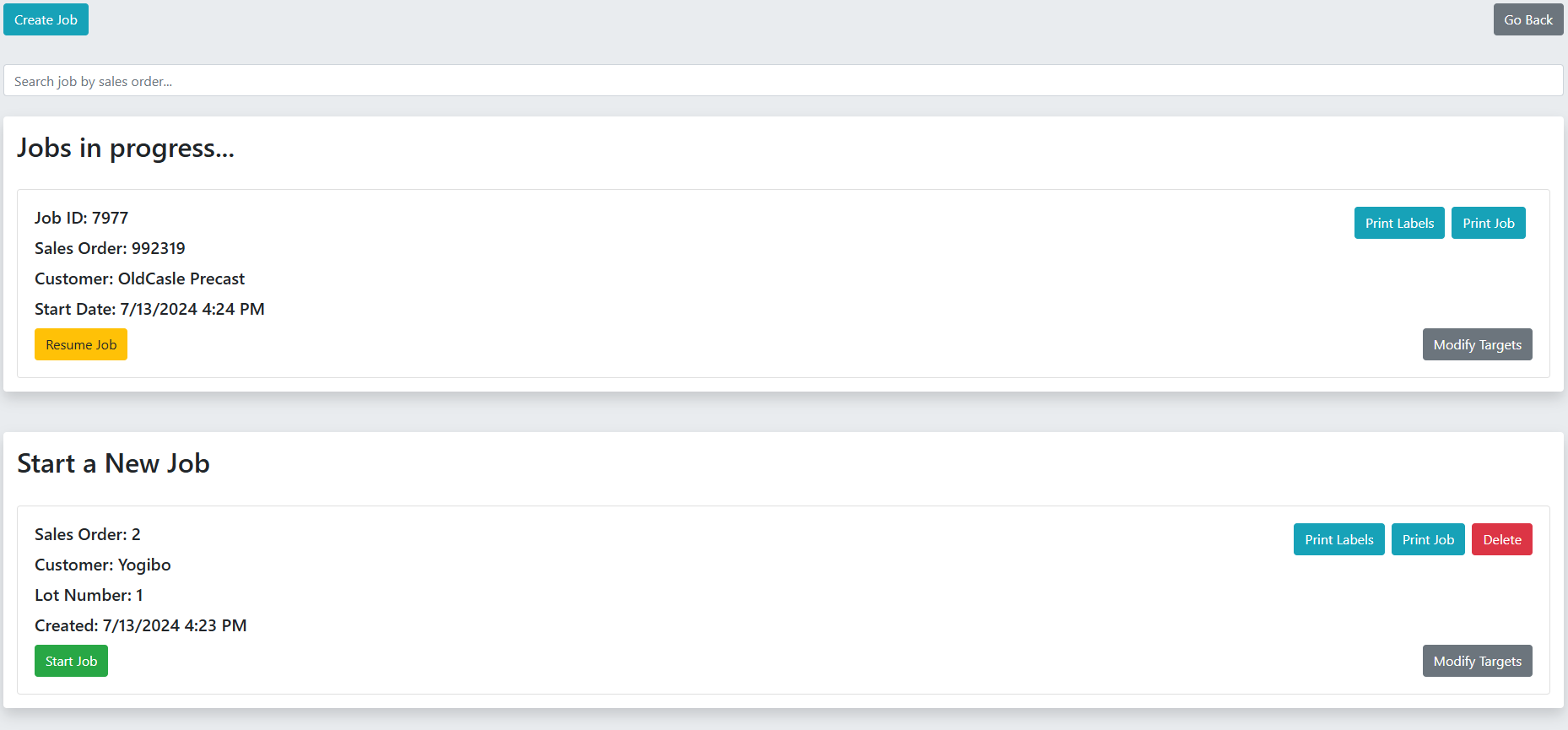
The main landing page displays all available EIFS jobs in two sections: jobs in progress and new jobs.
Interactive Elements
Search Bar
- Location: Top of page above job cards
- Function: Real-time search by sales order number
- Behavior: Hides job cards whose sales order doesn't match search input
- Implementation: JavaScript
search_jobs()function withonkeyupevent
Create Job Button (Factory Admin only)
- Location: Top-left corner
- Label: "Create Job" (blue button)
- Action: Redirects to
/eifs/create_job
Job Cards - In Progress Section
- Display: Yellow "Resume Job" button for each transitioned job
- Job Info Shown: Job ID, Sales Order, Customer, Start Date
- Resume Action: Redirects to
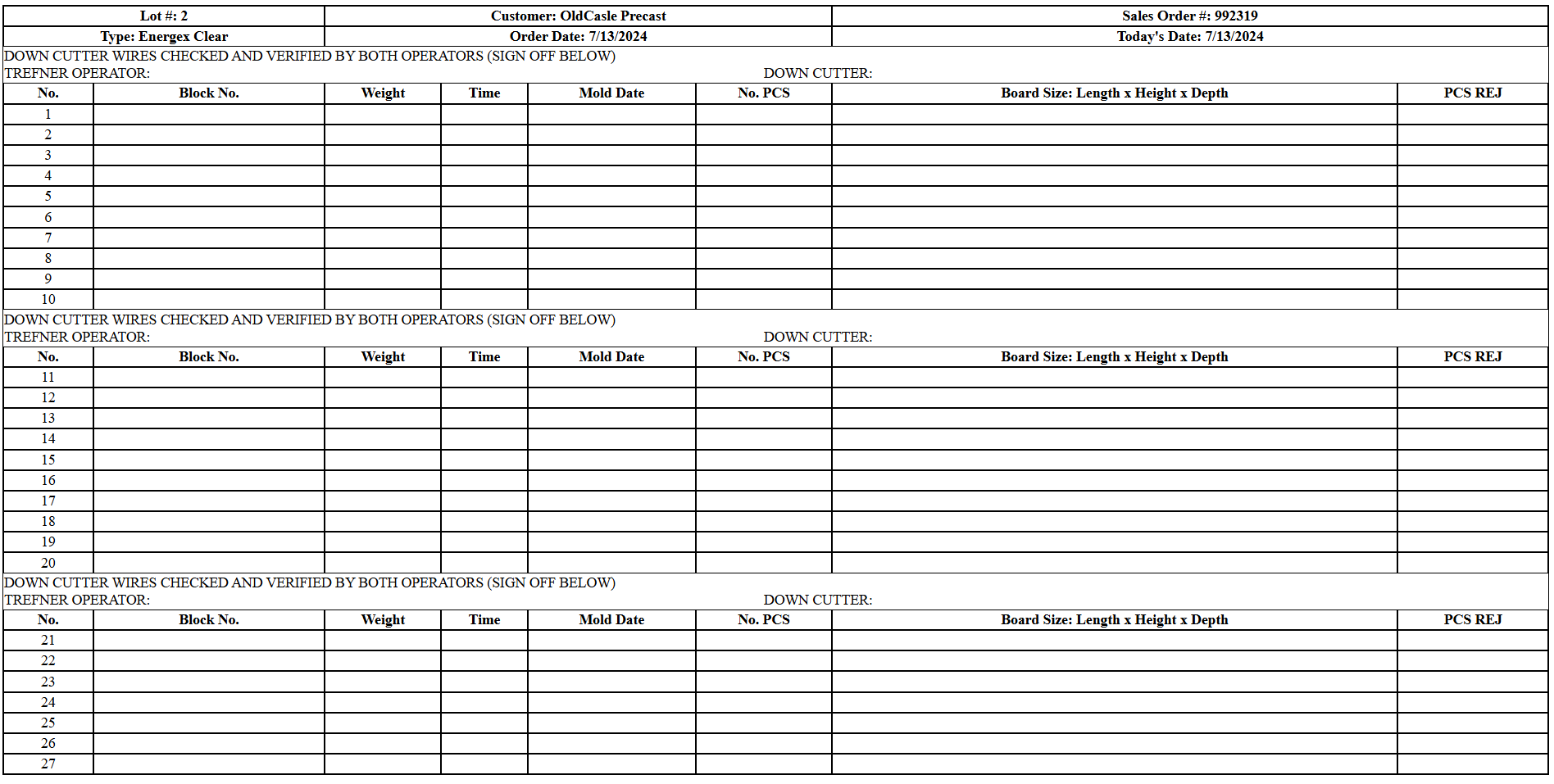
/eifs/resume/\{job_id\}/0 - Print Job Button (Admin only): Opens print preview of blank EIFS job template (27 rows)
- Print Labels Button (Admin only): Redirects to full line labels page
- Modify Targets Button (Admin only): Opens modal with editable Tabulator table
Job Cards - New Jobs Section
- Display: Green "Start Job" button for each unstarted job
- Job Info Shown: Sales Order, Customer, Lot Number, Created Date
- Start Action: Redirects to
/eifs/view/\{eifs_job_id\}/0 - Same admin buttons as in-progress section
Modify Targets Modal
- Trigger: Clicking "Modify Targets" button on any job card
- Table: Tabulator with inline editing (click quantity cell to edit)
- Columns: EIFS Bag Type Label | Quantity (editable)
- Footer: Bottom calculation shows sum of all targets
- Save Action: AJAX POST to
/api/eifs_job/update_targets
Visual Design
- Shadow cards with white background and rounded corners
- Two distinct sections separated by shadow containers
- Color-coded buttons (green = start, yellow = resume)
2. Start EIFS Job (/eifs/view/\{eifs_job_id\}/\{line_job\})
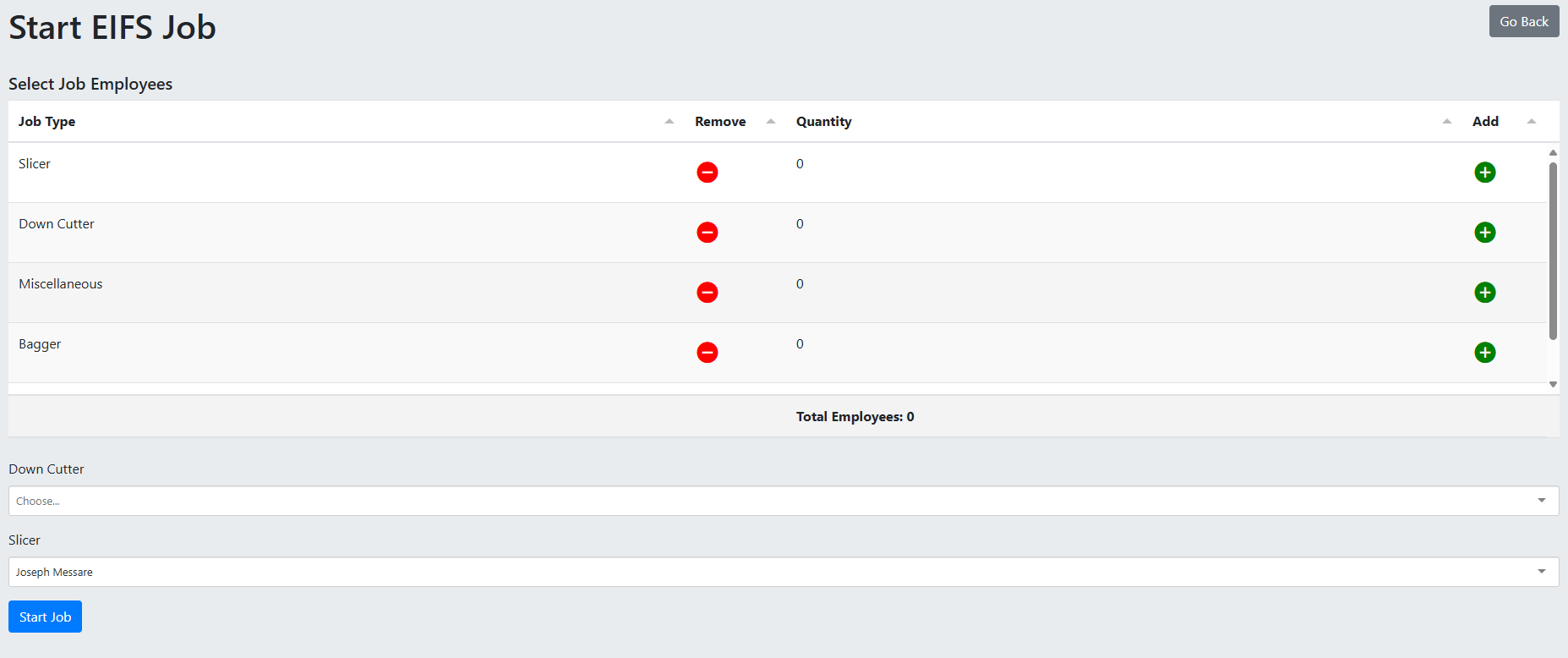
Employee selection page before starting a job.
Interactive Elements
Employee Selection Table
- Generated By: JavaScript fetches employee job types and dynamically creates checkboxes
- Display: Grid of employee job types (e.g., Machine Operator, Packer, Down Cutter)
- Function: Select which job types are working on this job
- Additional Input: For each selected job type, enter count of employees
Slicer Dropdown
- Label: "Slicer"
- Options: All users in 'eifs', 'admin', 'factory_admin' groups
- Default: Current logged-in user (pre-selected)
- Required: Yes
Down Cutter Dropdown
- Label: "Down Cutter"
- Options: Same as Slicer dropdown
- Default: None
- Required: Yes
Start Job Button
- Label: "Start Job" (blue button)
- Action: POST to
/eifs/start_job - Validation: Requires at least one employee job type selected with valid count
- Loading State: Shows spinner with "Starting job..." text on submit
Go Back Button
- Location: Top-right
- Action: Returns to
/eifs/add_eifs
3. EIFS In Progress (/eifs/in_progress/\{job_id\}/\{eifs_job_id\}/\{line_job\})
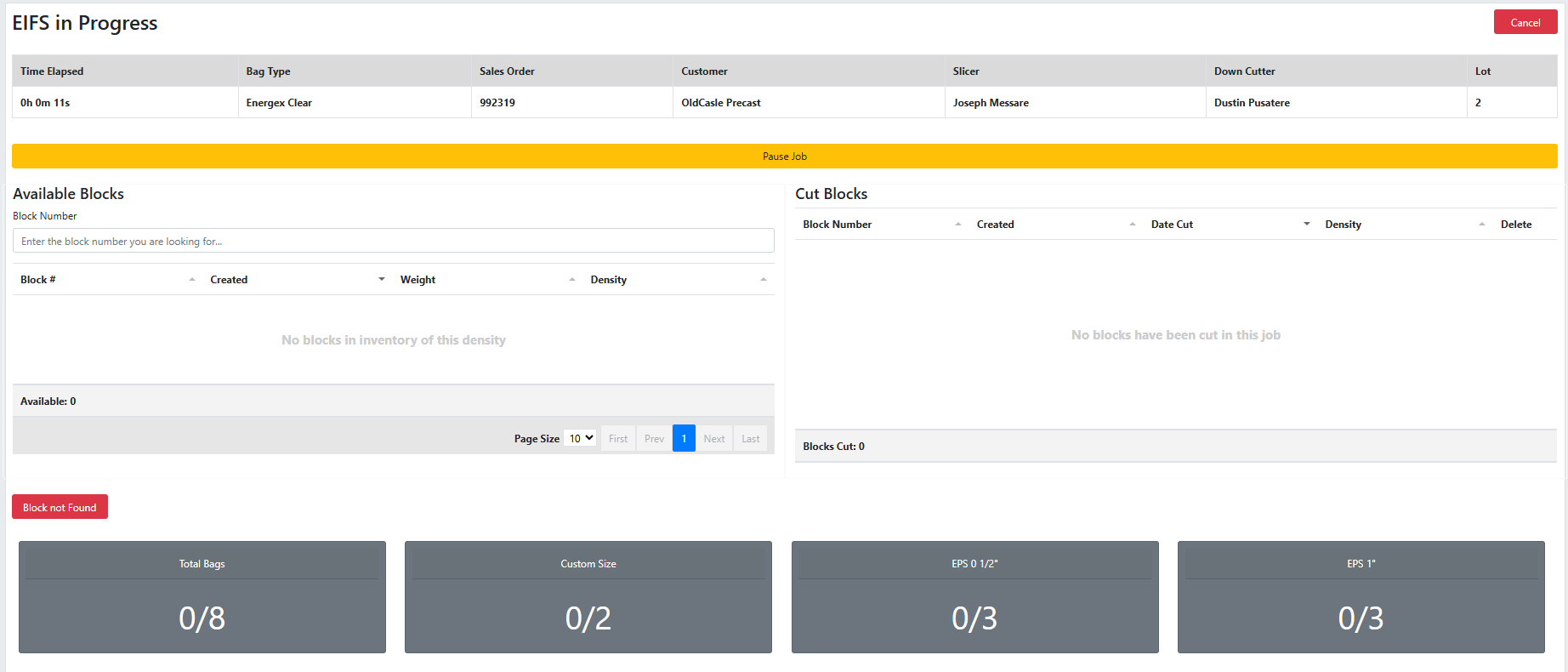
The main production page where blocks are cut and EIFS bags are created.
Job Data Table
Displayed Fields (horizontal table at top):
- Time Elapsed (updates every 1 second on front-end)
- Job ID (hidden)
- EIFS Job ID (hidden)
- Bag Type
- Sales Order
- Customer
- Slicer
- Down Cutter
- Lot Number
Real-time Timer
- Front-end: Updates every 1 second via
setInterval() - Back-end Sync: Saves to database every 5 seconds
- Format:
0h 0m 0s - Function:
increment_time(elapsed)
Block Management Section
Available Blocks Table (Left side)
- Library: Tabulator.js with remote pagination
- Data Source: AJAX POST to
/api/eifs_block/get - Filters: Only shows
1.0#EIFS and GPS density blocks in inventory - Search: Block number filter input (updates table on
onkeyup) - Columns: Block #, Created Date, Weight, Density
- Bottom Calc: Shows "Available:
\{count\}" - Pagination: 10, 20, 30, 50 per page options
- Row Click: Opens "Cut EIFS Bags" modal with selected block
Cut Blocks Table (Right side)
- Library: Tabulator.js
- Data Source: AJAX POST to
/api/eifs_block/get_cut_blocks - Columns: Block Number, Created Date, Date Cut, Density, Delete Button
- Bottom Calc: Shows "Blocks Cut:
\{count\}" - Cell Click: Opens "Modify EIFS Block" modal (except delete button)
- Delete Action: Calls
delete_eifs_block()function, returns block to inventory
Block Not Found Button
- Label: "Block not Found" (red button)
- Action: Opens modal to manually create missing block
- Use Case: When block number and date don't match any inventory block
Target Progress Cards
Display: Row of cards showing completion progress for each EIFS bag size
- Total Bags Card: Shows overall progress (e.g., "0/500")
- Individual Size Cards: One card per EIFS bag type target (e.g., "EPS 2"", "GPS 4"")
- Update Frequency: Every 3 seconds via AJAX to check targets
- Color: Gray background with white text
- Size: Large (50px font) for easy visibility from distance
Action Buttons
Pause Job Button
- Label: "Pause Job" (yellow, full-width)
- Action: Opens "Job is Paused" modal
- Function: Stops timer, prevents kiosk auto-shutdown for breaks
- Resume: Click "Resume Job" button in modal to continue
Transition Job Button
- Label: "Transition Job Owner" (yellow)
- Location: Bottom-left of page
- Action: Opens confirmation modal
- Function: POST to
/eifs/transition/\{job_id\}/\{eifs_job_id\}, sets transitioned timestamp - Use Case: Switching to different employee or leaving kiosk for >5 hours
Finish Job Button
- Label: "Finish Job" (blue)
- Location: Bottom-right of page
- Action: Opens "Flexural Load Test" modal
- Validation: Must have at least 1 block cut
Cancel Button
- Label: "Cancel" (red)
- Location: Top-left
- Action: GET to
/eifs/cancel/\{job_id\} - Function: Deletes all EIFS blocks/bags, resets job, returns inventory
Job Comments Textarea
- Label: "Job Comments:"
- Function: Free-text input for notes about the job
- Saved: Only when job is finished or transitioned
- Warning: Refreshing page loses comments if not saved
Modals
Cut EIFS Bags Modal
- Trigger: Clicking a row in Available Blocks table
- Title: "Cut Block
\{block_number\}" - Fields:
- Board Size dropdown (EIFS bag type sizes, e.g., "EPS 2"", "GPS 4"")
- Actions:
- "Cancel" - closes modal
- "Cut Block" - calls
cut_eifs_block(), creates EIFS block in cut table, automatically creates EIFS bags
- Behavior: After cutting, if block count is divisible by 10 and >1, shows sign-off modal
Sign Off Modal (Appears every 10 blocks)
- Title: "Sign Off"
- Purpose: Verify down cutter wires checked
- Fields:
- Slicer checkbox (labeled with slicer name)
- Down Cutter checkbox (labeled with down cutter name)
- Validation: Both checkboxes must be checked
- Action: "Sign Off" button - POST to
/api/eifs_sign_off/create - Auto-trigger: Shows after cutting 10th, 20th, 30th block, etc.
Modify EIFS Block Modal
- Trigger: Clicking any cell in Cut Blocks table (except delete button)
- Title: "Modify EIFS Block -
\{block_number\}" - Content: Tabulator table showing all EIFS bags created under this block
- Bag Table Columns: EIFS Bag Type, Bag Type, Date Created, Delete Button, Reject Button
- Add Bags Button: Reveals form to manually add bags to the block
- Add Bags Form:
- Bag Size dropdown (all EIFS bag types)
- Bag Type dropdown (targets + Half + Clear options)
- Bag Count input (number)
- "Add Bag" button
- Delete Bag: Removes bag from inventory, updates targets
- Reject Bag: Marks bag as rejected (grays out reject button)
Paused Job Modal
- Display: Modal with backdrop (cannot close by clicking outside)
- Title: "Job is Paused"
- Content: Single "Resume Job" button (green, full-width)
- Function: Closes modal, resumes timer
Transition Job Modal
- Title: "Transition EIFS Job"
- Content: Confirmation text "Are you sure you want to transition this job to another employee?"
- Actions:
- "Cancel" - closes modal
- "Transition Job" (yellow) - submits form, sends notification
Flexural Load Test Modal
- Trigger: Clicking "Finish Job" button
- Title: "Transition EIFS Job" (appears to be mislabeled)
- Fields:
- Test Result dropdown (Pass/Fail) - required
- Remarks textarea
- Loading (lbs) input - required, default from DB
- Length input - required, default from DB
- Width input - required, default from DB
- Height input - required, default from DB
- Actions:
- "Cancel" - closes modal
- "Finish Job" (blue) - submits form to
/eifs/finish
- Validation: Custom
validate()function checks for at least 1 block cut
Block Not Found Modal
- Title: "Create a Block"
- Purpose: Manually create missing mold cycle block
- Fields:
- Block Number input - required
- Weight input (step 0.01) - required
- Density dropdown (only shows "
1.0#EIFS" and "1.0#GPS") - required - From datepicker (defaults to today) - required
- Actions:
- "Close" - closes modal
- "Create Block" (blue) - calls
not_found(), POST to/api/block/not_found
- Notification: Sends admin notification with block details

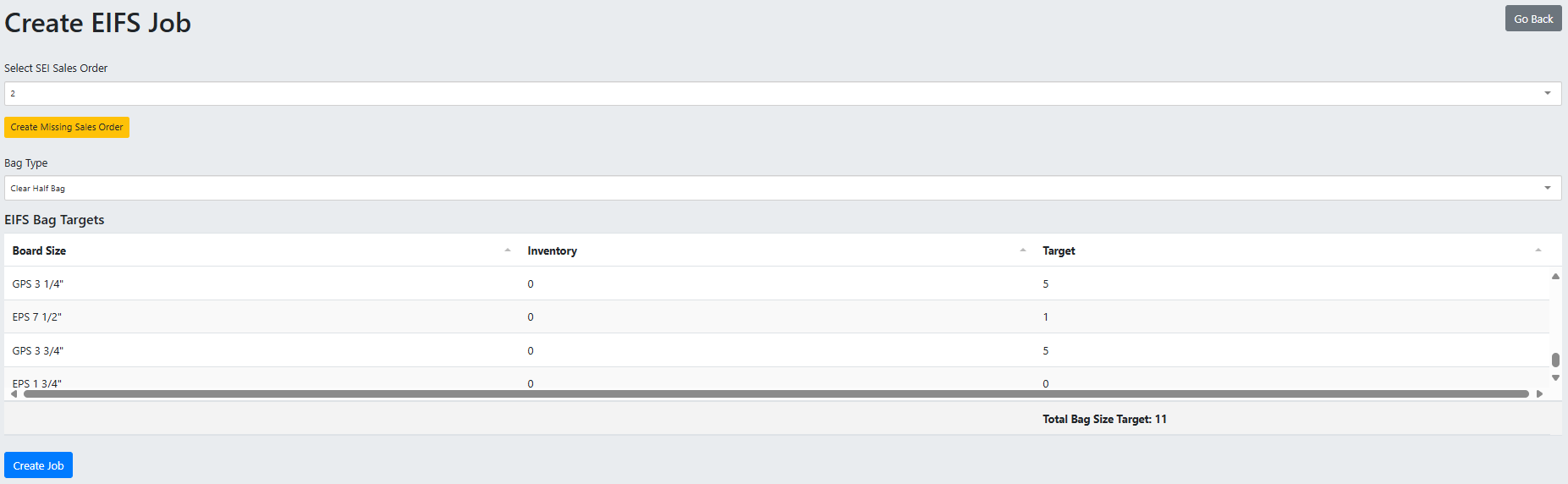
4. Create EIFS Job (/eifs/create_job)
Manual job creation page for factory admins when SAGE import fails.
Interactive Elements
SEI Sales Order Dropdown
- Label: "Select SEI Sales Order"
- Type: Selectized dropdown with search
- Function: Type sales order number to filter existing orders
- Required: Yes
- Data Source: Fetches from
/api/sales_orderendpoint
Create Missing Sales Order Button
- Label: "Create Missing Sales Order" (yellow, small button)
- Location: Below sales order dropdown
- Action: Opens "Create New Sales Order" modal
- Purpose: Create placeholder sales order when not found in system
Bag Type Dropdown
- Label: "Bag Type"
- Options: All bag types associated with "EIFS" job type
- Type: Selectized dropdown
- Required: Yes
EIFS Bag Targets Table
- Display: Tabulator table showing all EIFS bag types
- Columns: EIFS Bag Type Label | Current Inventory | Target Quantity (editable)
- Function: Set desired target for each EIFS bag size
- Validation: Each target must be >= 0
- Current Inventory: Shows existing EIFS bags in inventory (will be applied to job final count)
Create Job Button
- Label: "Create Job" (blue button)
- Action: POST to
/eifs/create_eifs_job - Validation: Custom
validate()function checks all required fields - Success: Redirects to
/eifs/add_eifs
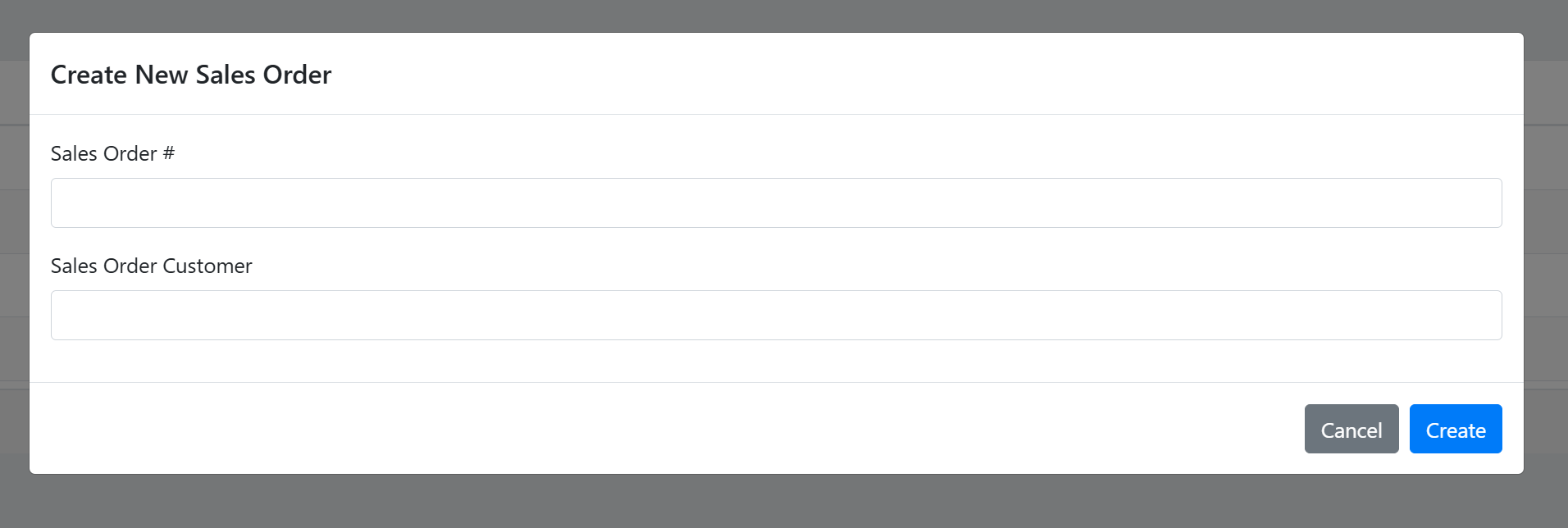
Create New Sales Order Modal
- Title: "Create New Sales Order"
- Fields:
- Sales Order # input (number) - required
- Sales Order Customer input (text) - required
- Actions:
- "Cancel" - closes modal
- "Create" (blue) - calls
create_sales_order(), POST to/api/sales_order/create
- Validation: Sales order number must be unique (checked on
onchange) - Behavior: Disables "Create" button if sales order number already exists (turns field red)
- Success: Closes modal, adds new sales order to dropdown, auto-selects it
5. EIFS Job Complete (/eifs/success/\{job_id\}/\{line_job\})
Success page shown after finishing an EIFS job.
Display Elements
Job Summary
- Job ID: Displays completed job ID
- Sales Order: Shows sales order number
- Customer: Shows customer name
- Bag Type: Shows bag type used
- Time Elapsed: Shows total time spent on job
Navigation Buttons
- "Start New Job" Button (green): Redirects to
/eifs/add_eifs(or/line/linesifline_job=1) - "Go Home" Button (secondary): Returns to user dashboard
Visual Design
- Success checkmark or completion message
- Clean, centered layout
- Large, easy-to-read text
Screenshot: EIFS Job Complete page showing job summary and navigation buttons
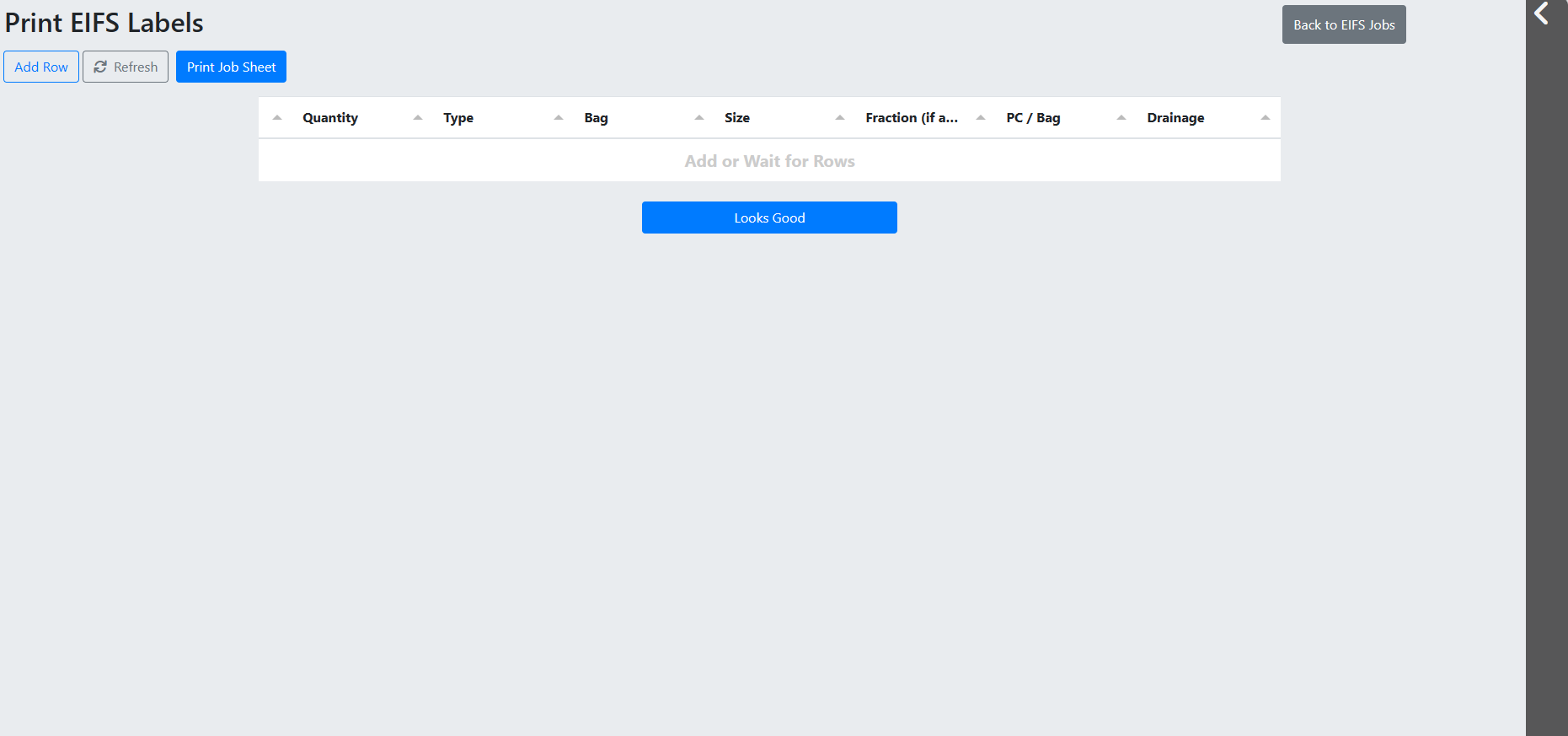
6. Print EIFS Labels (/eifs/eifs_labels and /eifs/full_line_labels)
Label printing interface primarily used before RoboPack installation.
Interactive Elements
Job Queue (Right side panel)
- Display: Collapsible gray column showing all active EIFS jobs
- Function: Toggle between jobs without leaving page
- Action: Clicking job card refreshes print label table with that job's targets
- Use Case: Quickly switch between multiple jobs to print labels
Print Label Table
- Display: Shows all stickers that need to be printed based on job targets
- Pre-populated: Lot Number and Sales Order Number in top-left
- Editable: Can add, remove, or modify label entries
- Print Action: Sends labels to printer (implementation depends on printer setup)
Full Line Labels (/eifs/full_line_labels)
- Additional Feature: Supports part types for Lines 1 & 2 integration
- Query Param:
?job_id=\{job_id\}to pre-populate job data
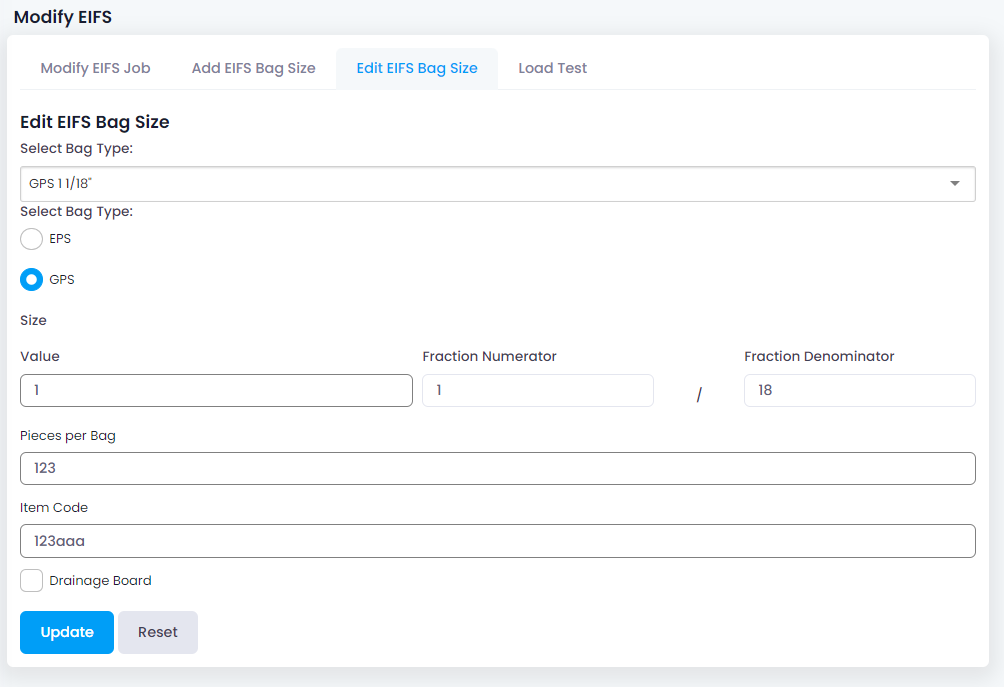
7. Edit EIFS (/eifs/edit)
Admin configuration page for EIFS settings (super admin, admin, factory admin only).
Management Sections
- Sticker Types: Manage EIFS-related sticker types
- EIFS Bag Types: Add/edit/delete EIFS bag sizes (e.g., "EPS 2"", "GPS 4 1/2"")
- Bag Types: Manage bag types used to wrap EIFS panels
- Users: Assign users to EIFS group
Details depend on standard admin panel implementation
Back-End Logic
Controllers
1. App\Controllers\Eifs
Main controller handling EIFS station views and job lifecycle operations.
Key Methods:
view(int $eifs_job_id, int $line_job): string|RedirectResponse - Eifs.php:572
- Displays the Start EIFS Job page
- Loads users in 'eifs', 'admin', 'factory_admin' groups for slicer/down cutter selection
- Validates eifs_job_id and line_job parameters
- Returns view
eifs/eifs
start_job(): RedirectResponse - Eifs.php:131
- Processes the start job form submission
- Validates employee selection, slicer, down cutter
- Creates
Eifs_employees_modelrecords for each employee job type selected - Updates
eifs_jobwith slicer_id, down_cutter_id, user_id, started=1 - Redirects to
in_progress()view
in_progress(int $job_id, int $eifs_job_id, int $line_job): string|RedirectResponse - Eifs.php:192
- Main production page where blocks are cut and EIFS bags created
- Loads job data, EIFS bag types, bag types, densities, targets
- Fetches default load test dimensions from DB field defaults
- Returns view
eifs/eifs_in_progress - Redirects to success page if job already finished
finish(): RedirectResponse - Eifs.php:397
- Validates flexural load test data (test_result, width, length, height, loading, comments)
- Checks that all target bags are in inventory before shipping
- Ships all target bags (first from job inventory, then from bench stock)
- Creates
Eifs_load_test_modelrecord with test results - Sets job.finish timestamp
- Redirects to
success()page
transition(int $job_id, int $eifs_job_id): RedirectResponse - Eifs.php:536
- Sets job.finish = NULL (marks as unfinished)
- Sets eifs_job.transitioned timestamp
- Sets eifs_job.transfer_time = job.elapsed
- Redirects to
/eifs/add_eifs
cancel(int $job_id): RedirectResponse - Eifs.php:328
- Deletes all EIFS blocks created in job (calls
delete_eifs_block()helper) - Deletes all employees associated with job
- Resets eifs_job: slicer_id=null, down_cutter_id=null, started=0, comments=null
- If resumed job, deletes newest eifs_job join table entry
- Returns inventory to original state
resume(int $job_id, int $line_job): RedirectResponse - Eifs.php:44
- Creates new
Eifs_job_modelrecord copying from previous eifs_job - Sets start_time = job.elapsed (continues from previous time)
- Sets started=1
- Redirects to
view()page
create_eifs_job(): RedirectResponse - Eifs.php:86
- Manual job creation (factory admins only)
- Validates sales_order_id, bag_type_id, targets for each EIFS bag type
- Creates new
Job_modelwith job_type_id = 'EIFS' - Creates
Eifs_job_modelwith auto-generated lot_number - Calls
save_eifs_targets()helper to create target records - Redirects to
/eifs/add_eifs
success(int $job_id, int $line_job): string|RedirectResponse - Eifs.php:493
- Displays job completion summary
- Loads job with eifs_job.sales_order and eifs_job.user relations
- Returns view
eifs/eifs_success - Changes title to "Lines 1 & 2 Job Complete" if line_job=1
add_eifs(): string - Eifs.php:278
- Main EIFS dashboard page
- Calls
get_eifs_jobs()helper to fetch transitioned and new jobs - Passes admin flag for conditional button display
- Returns view
eifs/eifs_jobs
create_job(): string - Eifs.php:602
- Displays manual job creation form
- Fetches employee job types for 'EIFS'
- Fetches bag types associated with 'EIFS' job type
- Returns view
eifs/create_eifs
edit(): string|RedirectResponse - Eifs.php:621
- Admin panel for EIFS configuration
- Requires 'super_admin', 'admin', or 'factory_admin' group
- Loads sticker types, EIFS bag types, bag types, users
- Returns view
admin/edit_eifs
export_load_tests(): ResponseInterface - Eifs.php:655
- Exports all EIFS load test data as CSV
- Joins job, eifs_load_test, eifs_job tables
- Downloads file as
eifs_load_tests.csv
2. App\Controllers\Api\EifsJob
API controller for EIFS job data operations.
Key Methods:
get_jobs(): ResponseInterface - EifsJob.php:37
- Returns all running EIFS jobs (started=1, finish=null)
- Returns all new EIFS jobs (started=0, finish=null)
- Includes eifs_job.sales_order relation
- Used by EIFS dashboard to display job cards
get_info(): ResponseInterface - EifsJob.php:55
- Fetches comprehensive job information
- Loads eifs_job with eifs_blocks, eifs_complaints, eifs_targets, sales_order, bag_type, user, slicer, down_cutter
- Calculates employee_count (sum of eifs_employees.count)
- Calculates bag completion counts per EIFS bag type
- Returns HTML string for bag_targets display
get_targets(): ResponseInterface - EifsJob.php:130
- Fetches all
Eifs_bag_target_modelrecords for job_id - Includes eifs_bag_type relation
- Used by modify targets modal
update_targets(): ResponseInterface - EifsJob.php:155
- Validates targets array with id and quantity fields
- Updates each
Eifs_bag_target_modelrecord - Ensures quantity > 0 and < 1001
create(): ResponseInterface - EifsJob.php:192
- Creates new EIFS job via API
- Validates sales_order_id, bag_type_id, and target quantities
- Auto-generates lot_number via
Eifs_job_model::getNextLotNumber() - Calls
save_eifs_targets()helper - Returns created job with relations
unfinish(): ResponseInterface - EifsJob.php:239
- Marks job as unfinished (job.finish = null)
- Sets eifs_job.transitioned timestamp
- Sets eifs_job.transfer_time = job.elapsed
- Used for admin forced transitions
get_trend_data(): ResponseInterface - EifsJob.php:266
- Calls
get_eifs_trend_data()helper - Returns weekly trend data for blocks cut
- Includes percentage change vs. previous week
3. App\Controllers\Api\EifsBlock
API controller for EIFS block inventory and cutting operations.
Key Methods:
get(): ResponseInterface - EifsBlock.php:200
- Paginated block search with remote filtering
- Filters: only
1.0#EIFS and GPS densities, created within last 6 months - Returns unused blocks OR partially used blocks (has <2 used_eifs_blocks)
- Supports block_num_search parameter for filtering
- Returns pagination metadata (page, size, last_page)
cut(): ResponseInterface - EifsBlock.php:83
- Validates eifs_job_id, block_id, eifs_bag_type_id
- If block.date_used is NULL, marks mold cycle block as used
- Calls
create_find_eifs_block()helper to get/create EIFS block - Calls
use_eifs_block()helper to mark EIFS block as cut - Returns updated EIFS block with relations
get_cut_blocks(): ResponseInterface - EifsBlock.php:255
- Fetches all EIFS blocks cut for a specific job
- Loads job.eifs_job.eifs_blocks.used_block.density relations
- Returns empty array if no blocks found
get_bags(): ResponseInterface - EifsBlock.php:159
- Fetches all EIFS bags created from specific EIFS block
- Includes bag_type and eifs_bag_type relations
- Used by "Modify EIFS Block" modal
get_job_blocks(): ResponseInterface - EifsBlock.php:131
- Fetches all blocks for a job with comprehensive relations
- Includes eifs_bags, rejected_eifs_bags, used_eifs_bags, cut_job, used_block
- Calls
get_cut_job_block_info()helper to calculate pcs_made and pcs_rej - Used for print job template
delete(): ResponseInterface - EifsBlock.php:56
- Validates eifs_block_id
- Calls
delete_eifs_block()helper - Returns deleted status
get_inventory(): ResponseInterface - EifsBlock.php:184
- Calls
get_eifs_block_inventory()helper - Returns count of EIFS blocks grouped by density
4. App\Controllers\Api\EifsBag
API controller for EIFS bag inventory operations.
Key Methods:
create(): ResponseInterface - EifsBag.php:169
- Validates eifs_bag_type_id, bag_type_id, bag_num, eifs_block_id
- Calls
create_eifs_bags()helper to create specified number of bags - Each bag is associated with eifs_block_id and add_job_id (from cut_job)
- Returns array of created EIFS bags
delete(): ResponseInterface - EifsBag.php:50
- Validates eifs_bag_id
- Calls
delete_eifs_bag()helper - Permanently removes bag from database
reject(): ResponseInterface - EifsBag.php:234
- Sets eifs_bag.date_rejected = current timestamp
- Marks bag as rejected (failed QC)
- Returns updated bag record
replace(): ResponseInterface - EifsBag.php:202
- Resets bag to unused status
- Sets date_used=NULL, use_job_id=NULL, date_rejected=NULL
- Returns bag to available inventory
ship(): ResponseInterface - EifsBag.php:114
- Validates eifs_bag_id, eifs_job_id
- Calls
ship_eifs_bag()helper - Sets date_used and use_job_id
- Marks bag as shipped to customer
get_job_bags(): ResponseInterface - EifsBag.php:141
- Fetches all bags created in a specific job
- Includes bag_type and eifs_bag_type relations
get_job_totals(): ResponseInterface - EifsBag.php:76
- Aggregates bag counts by type for a job
- Returns type_counts array and bag_total
- Used for target progress cards
add_type(): ResponseInterface - EifsBag.php:340
- Creates new EIFS bag type
- Validates type (eps/gps), size, numerator, denominator, item_code, pcs_per_bag, drainage_board
- Generates label via
get_eifs_label()helper - Item code must be unique
update_type(): ResponseInterface - EifsBag.php:381
- Updates existing EIFS bag type
- Validates same fields as add_type
- Ensures label uniqueness (excluding current record)
type_exists(): ResponseInterface - EifsBag.php:266
- Checks if EIFS bag type label already exists
- Generates label from type, size, numerator, denominator
- Returns
{exists: boolean}
get_inventory(): ResponseInterface - EifsBag.php:324
- Fetches all EIFS bag types with their associated bags
- Returns complete inventory view
Helper Functions (src/app/Helpers/eifs_helper.php)
create_eifs_bags(int $eifs_bag_type_id, int $bag_type_id, int $bag_num, int $eifs_block_id, int $add_job_id): array - eifs_helper.php:23
- Creates specified number of EIFS bags in inventory
- Associates bags with eifs_block_id and add_job_id (from cut job)
- Returns array of created
Eifs_bag_modelrecords
make_eifs_bags(string $bag_type_label, int $quantity, int $job_id, int $eifs_bag_type_id, int $eifs_block_id, int $add_job_id): void - eifs_helper.php:58
- Wrapper function for RoboPack integration
- Creates EIFS bags, removes stickers and bags from inventory
- Used for print label automation
get_eifs_label(string $type, int $size, int $num, int $denom): string|null - eifs_helper.php:89
- Generates standardized EIFS bag type label
- Format: "GPS 4"" or "EPS 2 1/2""
- Returns null if fraction is invalid (num >= denom)
get_eifs_bag_type_info(int $eifs_bag_type_id): array - eifs_helper.php:123
- Parses EIFS bag type label into components
- Returns ['type', 'size_value', 'size_numerator', 'size_denominator']
find_eifs_bag_type(int $size_num, int $size_numerator, int $size_denominator, string $print_label): int - eifs_helper.php:163
- Searches for EIFS bag type by size parameters
- Returns eifs_bag_type.id or -1 if not found
delete_eifs_block(int $used_eifs_block_id): bool - eifs_helper.php:194
- Deletes EIFS block and all associated bags
- Removes eifs_bags, used_eifs_bags, rejected_eifs_bags
- Returns mold cycle block to inventory if this was only EIFS block
delete_eifs_bag(int $eifs_bag_id): bool - eifs_helper.php:243
- Permanently deletes EIFS bag from database
- Returns true on success
get_eifs_jobs(): array - eifs_helper.php:253
- Fetches all transitioned/running jobs (started=1, transitioned not null OR elapsed=00:00:00)
- Fetches all new jobs (started=0)
- Returns ['jobs', 'new_jobs'] arrays
ship_eifs_bag(int $eifs_bag_id, int $eifs_job_id): Eifs_bag_model - eifs_helper.php:280
- Sets eifs_bag.use_job_id and date_used
- Returns updated bag model
use_eifs_block(int $eifs_block_id, int $cut_job_id, int $eifs_bag_type_id): Eifs_block_model - eifs_helper.php:299
- Marks EIFS block as used
- Sets date_used, cut_job_id, eifs_bag_type_id
- Returns updated block model
create_find_eifs_block(int $block_id, int $eifs_bag_type_id): Eifs_block_model|null - eifs_helper.php:323
- Checks if mold cycle block has <2 EIFS blocks already used
- If unused EIFS blocks exist, returns first one
- Otherwise creates new EIFS block with suffix 'a' or 'b'
- Returns null if 2 blocks already cut from mold cycle
get_cut_job_block_info(array $blocks): array - eifs_helper.php:363
- Calculates pcs_made, pcs_rej for each block
- Divides block weight by 2 (split between 'a' and 'b' blocks)
- Adds sequential number to each block
create_eifs_block(int $block_id): array|null - eifs_helper.php:393
- Creates two EIFS blocks ('a' and 'b') from mold cycle block
- Returns null if blocks already exist
- Returns array of two created
Eifs_block_modelrecords
get_eifs_block_inventory(): array - eifs_helper.php:429
- Groups EIFS blocks by density
- Returns count, density.id, density.label for each group
get_eifs_avg_employee_count(string $start_date, string $end_date): float - eifs_helper.php:449
- Calculates average employee count for date range
- Sums eifs_employee_job.count for each job
- Returns average rounded to 2 decimals
get_eifs_trend_data(): array - eifs_helper.php:469
- Gets blocks cut per day for current and last week
- Calculates weekly totals and percentage change
- Includes avg employee count per day
- Used for dashboard analytics
save_eifs_targets(array $targets, int $job_id): void - eifs_helper.php:507
- Creates
Eifs_bag_target_modelrecord for each EIFS bag type - Sets quantity from
target_\{eifs_bag_type_id\}POST values - Associates with job_id and gen_bag_type_id
get_eifs_job_info(Job_model $job, array $filters): array|Job_model - eifs_helper.php:535
- Loads eifs_jobs relation (whereNull transitioned)
- Calculates progress percentage (bags_created / target_total)
- Adds sales_order and customer to job data
- Returns job with additional calculated fields
find_eifs_block_id(int $job_id, int $eifs_bag_type_id): int - eifs_helper.php:574
- Searches for EIFS block in job with <12 bags and matching eifs_bag_type_id
- Returns eifs_block.id or -1 if not found
- Used to find which block to add bags to
Database Models
Key Models
Eifs_job_model
- Table:
eifs_job - Relations:
belongsTojob, sales_order, bag_type, user, slicer, down_cutterhasManyeifs_blocks, eifs_bags, employees, eifs_sign_offs
- Key Fields: job_id, sales_order_id, lot_number, bag_type_id, user_id, slicer_id, down_cutter_id, started, transitioned, start_time, transfer_time
Eifs_block_model
- Table:
eifs_block - Relations:
belongsToused_block (Block_model), cut_job (Eifs_job_model), eifs_bag_typehasManyeifs_bags, used_eifs_bags, rejected_eifs_bags
- Key Fields: used_block_id, block_num, cut_job_id, date_used, eifs_bag_type_id
Eifs_bag_model
- Table:
eifs_bag - Relations:
belongsToeifs_bag_type, bag_type, eifs_block, add_job (Eifs_job_model), use_job (Eifs_job_model)
- Key Fields: eifs_bag_type_id, bag_type_id, eifs_block_id, add_job_id, use_job_id, date_used, date_rejected
Eifs_bag_target_model
- Table:
eifs_bag_target - Relations:
belongsTojob, eifs_bag_type, gen_bag_type (Bag_type_model)
- Key Fields: job_id, bag_type_id, gen_bag_type_id, quantity
- Static Method:
getJobTargetTotal(int $job_id): int- Sums all target quantities for job
Eifs_bag_type_model
- Table:
eifs_bag_type - Relations:
hasManyeifs_bags - Key Fields: label, item_code, pcs_per_bag, drainage_board
Eifs_employees_model
- Table:
eifs_employee_job - Relations:
belongsToeifs_job, employee_job - Key Fields: eifs_job_id, employee_job_id, count
Eifs_sign_off_model
- Table:
eifs_sign_off - Relations:
belongsToeifs_job, slicer (User_model), down_cutter (User_model) - Key Fields: eifs_job_id, slicer_id, down_cutter_id
Eifs_load_test_model
- Table:
eifs_load_test - Relations:
belongsTojob, user - Key Fields: job_id, user_id, test_result, width, length, height, loading, comments
Eifs_complaint_model
- Table:
eifs_complaint - Relations:
belongsTojob - Key Fields: job_id, complaint
Authorization
Authorization is handled via CodeIgniter Shield user groups:
- 'eifs' group: Access EIFS station, start/resume jobs, cut blocks
- 'factory_admin' group: All eifs permissions + create jobs, delete jobs, modify targets
- 'admin' group: All factory_admin permissions + edit EIFS settings, export load tests
Authorization checks are performed in controllers:
if(auth()->user()->inGroup('factory_admin', 'admin')) {
    // Show create job button
}
Cost Calculation
EIFS jobs track both labor and material costs:
Labor Cost Formula:
Labor Cost = Sum(Rate of Employee Pay × # of type employees)
Material Cost Formula:
Material Cost = Sticker Cost + Bag Cost + Box Cost + Block Cost
Material costs are "stamped" at job creation time to preserve historical pricing.
Notification System
EIFS operations send admin notifications for:
- Job Completion: When
finish()is called, sends notification with job ID, bag type, sales order, customer - Job Transition: When
transition()is called, sends notification with job ID and username - Block Not Found: When manual block creation occurs, sends notification with block details
Notifications are sent via send_notification() helper function defined in notification_helper.php.
Real-time Updates
The EIFS in-progress page uses two update intervals:
- Timer Display: Front-end updates every 1 second via JavaScript
setInterval() - Database Sync: Job elapsed time saved to database every 5 seconds
- Target Progress: AJAX calls to update target cards every 3 seconds
This ensures accurate time tracking while minimizing database writes.
EIFS Block Lifecycle
- Mold Cycle Block created at Mold station with
1.0#EIFS or GPS density - Split into EIFS Blocks: When first cut, creates two EIFS blocks suffixed 'a' and 'b'
- EIFS Block Cut: User selects block from inventory, specifies bag size
- EIFS Bags Created: Automatically creates bags associated with EIFS block
- Bags Shipped: When job finishes, bags are marked as shipped (date_used set)
Each mold cycle block can only create 2 EIFS blocks maximum ('a' and 'b').
Sign-Off System
Every 10 blocks cut, a sign-off modal appears requiring both the Slicer and Down Cutter to verify down cutter wires were checked. This creates an Eifs_sign_off_model record with:
- eifs_job_id
- slicer_id
- down_cutter_id
- created_at timestamp
Sign-offs are displayed in the print job template.
Flexural Load Test
Required for every completed EIFS job. Records:
- Test Result: Pass/Fail (boolean)
- Dimensions: Length, Width, Height (decimal)
- Loading: Weight in lbs (decimal)
- Remarks: Free-text comments
- Test Tech: Auto-filled with current user
Load test data is exported via /eifs/export_load_tests endpoint as CSV.
Developer Notes
EIFS Job Lifecycle
EIFS jobs follow a complex multi-state lifecycle:
- Created (started=0): Job appears in "New Jobs" section after SAGE import or manual creation
- Started (started=1, elapsed=00:00:00): Employee selection completed, timer starts
- In Progress: Blocks being cut, bags being created
- Transitioned (transitioned timestamp set): Job paused and handed to different employee
- Resumed: New eifs_job record created copying previous job data
- Finished (job.finish timestamp set): Load test completed, bags shipped
Critical State Logic:
- A job with
started=1andtransitioned IS NOT NULLappears in "Jobs in progress" - A job with
started=1andelapsed='00:00:00'ANDtransitioned IS NULLalso appears in "Jobs in progress" - When transitioning,
job.finishis set to NULL to mark as incomplete - When resuming, a NEW
eifs_jobrecord is created (not updated) withstart_time = previous job.elapsed
EIFS Block Architecture
Mold Cycle → EIFS Block Relationship:
- One mold cycle block (created at Mold station) can create exactly 2 EIFS blocks (suffixed 'a' and 'b')
- Each EIFS block represents half the mold cycle block
- Block weight is divided by 2 when displaying EIFS block weight
- Once 2 EIFS blocks are cut from a mold cycle, no more can be created
EIFS Block States:
- Unused:
eifs_block.date_used IS NULL,eifs_block.cut_job_id IS NULL - Cut:
date_usedandcut_job_idpopulated, associated with EIFS job
Finding Blocks for Cutting:
- Only blocks with density "
1.0#EIFS" or "1.0#GPS" shown - Only blocks created within last 6 months shown
- Unused blocks OR partially used blocks (< 2 EIFS blocks cut) shown
- Block search supports filtering by block_num
EIFS Bag Creation
Automatic Bag Creation: When a block is cut, EIFS bags are not created immediately. Instead:
- User selects block from inventory
- User specifies board size (EIFS bag type)
- System marks EIFS block as used
- System associates EIFS block with bag type
- User manually adds bags via "Modify EIFS Block" modal OR bags are created by RoboPack integration
Manual Bag Addition:
- Open "Modify EIFS Block" modal
- Click "Add Bags" button
- Select bag size, bag type, quantity
- System calls
create_eifs_bags()helper - Each bag is associated with
eifs_block_idandadd_job_id(from cut_job)
Bag Shipping: When job finishes, target bags are shipped:
- System checks if enough bags exist in inventory
- First ships bags created in current job (matching
add_job_id) - Then ships bags from bench stock (other jobs) to meet target
- Sets
eifs_bag.use_job_idanddate_usedfor each shipped bag
Target Progress Calculation
Progress Percentage Formula:
progress = (bags_created / target_total) * 100
Bag Counting Logic:
- Counts all EIFS bags where
add_job_id = eifs_job.id - Groups by
eifs_bag_type_idfor individual size progress - Updates every 3 seconds via AJAX polling
Target Display:
- Total Bags card shows overall progress (e.g., "250/500")
- Individual size cards show per-type progress (e.g., "EPS 2": 100/200")
- Cards use large 50px font for visibility from distance
Sign-Off Trigger Logic
Sign-off modal appears when:
if(block_count % 10 === 0 && block_count > 1) {
    // Show sign-off modal
}
This means sign-offs occur after cutting the 10th, 20th, 30th block, etc.
Sign-Off Record:
- Creates
Eifs_sign_off_modelwith eifs_job_id, slicer_id, down_cutter_id - Both slicer and down cutter checkboxes must be checked
- Sign-offs are displayed in print job template
Lot Number Generation
EIFS jobs use auto-generated lot numbers:
Eifs_job_model::getNextLotNumber()
This method:
- Fetches the highest existing lot_number
- Increments by 1
- Returns new lot number as string
Lot numbers are unique across all EIFS jobs.
EIFS Bag Type Label Format
Label Generation:
get_eifs_label(string $type, int $size, int $num, int $denom): string|null
Format Examples:
"EPS 2\""- Whole number size"GPS 4 1/2\""- Fractional size"EPS 1 3/4\""- Another fractional size
Validation:
nummust be <denom(proper fraction)- If
num >= denom, returnsnull - Type must be 'EPS' or 'GPS' (case-insensitive)
Parsing Labels:
get_eifs_bag_type_info(int $eifs_bag_type_id): array
// Returns: ['type', 'size_value', 'size_numerator', 'size_denominator']
Timer Synchronization
Front-End Timer:
setInterval(() => {
    elapsed = increment_time(elapsed);
    updateDisplay(elapsed);
}, 1000); // Updates every 1 second
Back-End Sync:
setInterval(() => {
    saveElapsedTime(job_id, elapsed);
}, 5000); // Saves to DB every 5 seconds
Resume Logic:
- New eifs_job record created with
start_time = previous_job.elapsed - Timer continues from where it left off
- Total time = sum of all eifs_job elapsed times for the parent job
Flexural Load Test Defaults
Load test form fields are pre-populated with defaults from database:
width- Fromeifs_load_testtable field defaultlength- Fromeifs_load_testtable field defaultheight- Fromeifs_load_testtable field defaultloading- Fromeifs_load_testtable field default
These defaults are loaded in Eifs::in_progress() via:
$db->getFieldData('eifs_load_test')
RoboPack Integration
Endpoint: /api/eifs_bag/make_bags
Process:
- RoboPack calls endpoint with print label data
- System creates EIFS bags via
make_eifs_bags()helper - Helper removes stickers and bags from inventory
- Helper creates EIFS bag records
- Returns success/error response
Helper Function:
make_eifs_bags(string $bag_type_label, int $quantity, int $job_id,
               int $eifs_bag_type_id, int $eifs_block_id, int $add_job_id): void
Block Not Found Workflow
When a block number doesn't exist in inventory:
- User clicks "Block not Found" button
- Modal opens with form to manually create block
- User enters: block_num, weight, density (only
1.0#EIFS/GPS), date - System calls
/api/block/not_found - Creates new
Block_modelrecord with entered data - Sends admin notification: "Block not found notification: Block
{block_num}added manually" - Block immediately appears in Available Blocks table
Use Case: Physical block exists but wasn't tracked in system (data entry error, system downtime, etc.)
Inventory Transaction Pattern
Using Blocks:
- Mark mold cycle block as used:
block.date_used,block.cut_job_id - Create or find EIFS block (suffixed 'a' or 'b')
- Mark EIFS block as used:
eifs_block.date_used,eifs_block.cut_job_id
Restoring Blocks (via Delete):
- Delete all EIFS bags from EIFS block
- If this is the only EIFS block from mold cycle:
- Delete both EIFS blocks
- Reset mold cycle:
block.date_used = NULL,block.cut_job_id = NULL
- If other EIFS blocks exist:
- Reset EIFS block:
eifs_block.date_used = NULL,eifs_block.cut_job_id = NULL
- Reset EIFS block:
Common Pitfalls
1. Forgetting to Load Relations
// BAD - Will cause N+1 queries
$jobs = Job_model::all();
foreach($jobs as $job) {
    echo $job->eifs_job->sales_order->label; // N+1!
}

// GOOD - Eager load relations
$jobs = Job_model::with('eifs_job.sales_order')->get();
foreach($jobs as $job) {
    echo $job->eifs_job->sales_order->label;
}
2. Not Handling Null EIFS Jobs
// BAD
$job = Job_model::find($id);
$sales_order = $job->eifs_job->sales_order->label; // Crashes if no eifs_job

// GOOD
$job = Job_model::with('eifs_job.sales_order')->find($id);
if($job !== null && $job->eifs_job !== null && $job->eifs_job->sales_order !== null) {
    $sales_order = $job->eifs_job->sales_order->label;
}
3. Incorrect Block Weight Calculation
// BAD - Using full block weight
echo $eifs_block->used_block->weight; // Shows 40 lbs

// GOOD - Dividing by 2 (EIFS blocks are halves)
echo $eifs_block->used_block->weight / 2; // Shows 20 lbs
4. Confusing add_job_id vs use_job_id
add_job_id- EIFS job that CREATED the bag (cut the block)use_job_id- EIFS job that SHIPPED the bag to customer- A bag created in Job A can be shipped in Job B
5. Not Validating Block Cut Limit
// BAD - Allowing unlimited EIFS blocks
$eifs_block = new Eifs_block_model();
$eifs_block->used_block_id = $block_id;
$eifs_block->save();

// GOOD - Check limit before creating
$block = Block_model::with('used_eifs_blocks')->find($block_id);
if(count($block->used_eifs_blocks) >= 2) {
    throw new Exception('Maximum 2 EIFS blocks per mold cycle');
}
Testing Recommendations
Unit Tests:
- Test
get_eifs_label()with various inputs (whole numbers, fractions, invalid fractions) - Test
create_find_eifs_block()with 0, 1, and 2 existing EIFS blocks - Test
delete_eifs_block()with both single and double EIFS blocks - Test lot number generation with concurrent requests
- Test bag shipping with insufficient inventory
Integration Tests:
- Test complete job lifecycle (create → start → cut blocks → finish)
- Test job transition and resume
- Test sign-off creation at 10 block intervals
- Test RoboPack integration endpoint
- Test block not found workflow
Manual Testing Checklist:
- Create EIFS job manually (factory admin)
- Create EIFS job via SAGE import
- Start job with employee selection
- Cut 10 blocks and verify sign-off appears
- Modify EIFS block and add bags manually
- Delete EIFS block and verify inventory restored
- Pause job and verify timer stops
- Transition job and verify transitioned timestamp
- Resume transitioned job
- Finish job with load test
- Verify bags shipped correctly
- Print job template and verify sign-offs appear
- Export load tests as CSV
- Test block not found creation
- Verify target progress updates
Performance Considerations
1. Available Blocks Table Pagination
- Uses server-side pagination (Tabulator remote pagination)
- Limit: 10/20/30/50 results per page
- Only loads current page data from database
- Search filter applied before pagination
2. Target Progress Polling
- Updates every 3 seconds via AJAX
- Consider increasing interval if database load is high
- Consider WebSocket implementation for real-time updates
3. Eager Loading
- Always eager load relations in dashboard queries
- Example:
Job_model::with('eifs_job.sales_order', 'eifs_job.bag_type') - Reduces N+1 query problems
4. Block Search Optimization
- Only searches blocks from last 6 months
- Uses database indexes on
createdanddate_usedcolumns - Consider adding composite index on (density_id, date_used, created)
Security Notes
Authorization:
- All EIFS routes require authentication via CodeIgniter Shield
- Group checks use
auth()->user()->inGroup('eifs', 'admin', 'factory_admin') - API endpoints validate group membership in controller methods
Input Validation:
- All API endpoints use CodeIgniter validation rules
- Validation errors logged with
log_message('error', ...) - Never trust client-side validation alone
SQL Injection Prevention:
- Using Eloquent ORM prevents most SQL injection
- All user inputs passed through parameter binding
- Raw queries should use
$db->escape()or parameter binding
Mass Assignment Protection:
- Models use
$fillableor$guardedproperties - Only validated data passed to
fill()method - Never use
Model::create($this->request->getPost())directly
Debugging Tips
1. Enable Query Logging:
// In controller method
\Illuminate\Database\Capsule\Manager::enableQueryLog();
// ... perform queries ...
$queries = \Illuminate\Database\Capsule\Manager::getQueryLog();
log_message('debug', json_encode($queries, JSON_PRETTY_PRINT));
2. Log EIFS Job State:
log_message('info', 'EIFS Job State: ' . json_encode([
    'job_id' => $job->id,
    'eifs_job_id' => $job->eifs_job->id,
    'started' => $job->eifs_job->started,
    'transitioned' => $job->eifs_job->transitioned,
    'elapsed' => $job->elapsed,
    'finish' => $job->finish,
], JSON_PRETTY_PRINT));
3. Inspect Block Relationships:
$block = Block_model::with('eifs_blocks', 'used_eifs_blocks')->find($id);
log_message('debug', 'Block ' . $block->block_num . ' has ' .
    count($block->used_eifs_blocks) . ' used EIFS blocks and ' .
    count($block->eifs_blocks) . ' unused EIFS blocks');
4. Check Tabulator AJAX Responses:
- Open browser DevTools → Network tab
- Filter by XHR requests
- Inspect
/api/eifs_block/getresponse payload - Verify pagination metadata (page, size, last_page)
Code Style Guidelines
Follow CodeIgniter 4 and project-specific conventions:
Controllers:
- Use type hints for parameters and return types
- Use
ResponseInterfacereturn type for API methods - Use
ResponseTraitfor API responses ($this->respond(),$this->respondCreated(), etc.) - Validate all user inputs before processing
Models:
- Use Eloquent ORM, not Query Builder (unless necessary)
- Define relationships using
belongsTo(),hasMany(), etc. - Use
$fillableto whitelist mass-assignable fields - Use soft deletes where appropriate (EIFS doesn't use this)
Helpers:
- Pure functions when possible (no side effects)
- Use type hints for all parameters and return values
- Document complex business logic with inline comments
- Return early to reduce nesting
JavaScript:
- Use ES6+ syntax (const/let, arrow functions, template literals)
- Use jQuery for DOM manipulation and AJAX (project standard)
- Use Tabulator.js for data tables
- Keep functions small and focused
Future Enhancements
Planned Improvements:
- Real-time Updates: Replace polling with WebSocket connections for target progress
- Offline Mode: Allow kiosk operation during network outages with sync when online
- Barcode Scanning: Scan block numbers instead of typing/searching
- Mobile App: Native iOS/Android app for EIFS operators
- Advanced Analytics: Machine learning for block cutting optimization
- Photo Attachments: Allow operators to attach photos to sign-offs or complaints
- Voice Commands: Hands-free operation for operators wearing gloves
- Automated Testing: Expand test coverage to >80%
Technical Debt:
- Refactor timer logic into shared service (duplicated across stations)
- Standardize error handling across all API endpoints
- Migrate from jQuery to Vue.js or React for better state management
- Add TypeScript for better type safety in JavaScript
- Implement caching layer (Redis) for frequently accessed data
Example Usage
Example 1: Standard EIFS Job (SAGE Import)
Scenario: A customer orders 500 EPS 2" EIFS panels via sales order #12345
-
Automatic Job Creation
- SAGE import runs nightly
- Detects sales order #12345 for EIFS panels
- Creates
Job_modelwith job_type_id = 'EIFS' - Creates
Eifs_job_modelwith:sales_order_id: 145
lot_number: "2025-001" (auto-generated)
bag_type_id: 3 (Clear 4x4x24)
started: 0 - Creates
Eifs_bag_target_modelrecords:EPS 2": 500 bags (target)
-
Starting the Job
- Operator navigates to
/eifs/add_eifs - Sees job card in "Start a New Job" section
- Clicks "Start Job"
- Redirected to
/eifs/view/\{eifs_job_id\}/0 - Selects employees:
- Machine Operator: 2 employees
- Packer: 3 employees
- Selects Slicer: "John Smith" (current user)
- Selects Down Cutter: "Jane Doe"
- Clicks "Start Job"
- System creates employee records and redirects to in-progress page
- Operator navigates to
-
Cutting First Block
- Available Blocks table shows
1.0#EIFS blocks - Operator clicks block #12345A (weight: 20 lbs, created: 2025-10-20)
- "Cut EIFS Bags" modal appears
- Operator selects board size: "EPS 2""
- Clicks "Cut Block"
- System:
- Marks mold cycle block as used
- Creates EIFS block #12345Aa
- Marks EIFS block as cut
- Block appears in Cut Blocks table
- Operator manually adds bags via "Modify EIFS Block":
- Opens modal, clicks block in Cut Blocks table
- Clicks "Add Bags"
- Selects: Bag Size: "EPS 2"", Bag Type: "Clear 4x4x24", Count: 12
- System creates 12 EIFS bags
- Target progress updates: "12/500"
- Available Blocks table shows
-
Sign-Off After 10 Blocks
- Operator cuts 9 more blocks (total: 10 blocks, 120 bags)
- After 10th block cut, sign-off modal appears automatically
- Modal shows:
- ☐ John Smith (Slicer)
- ☐ Jane Doe (Down Cutter)
- Both operators check their boxes
- Click "Sign Off"
- System creates
Eifs_sign_off_modelrecord - Modal closes, operator continues
-
Completing Remaining Blocks
- Operator cuts 32 more blocks (total: 42 blocks, 504 bags)
- Sign-off modals appear at block 20, 30, 40
- Target progress shows: "504/500" (100.8%)
-
Finishing the Job
- Operator clicks "Finish Job"
- Flexural Load Test modal appears
- Fills in form:
- Test Result: Pass
- Width: 2.5" (pre-filled from default)
- Length: 12" (pre-filled from default)
- Height: 24" (pre-filled from default)
- Loading: 50 lbs (pre-filled from default)
- Remarks: "Sample passed all tests"
- Clicks "Finish Job"
- System:
- Validates 504 bags exist in inventory
- Ships 500 bags to job (sets use_job_id, date_used)
- Creates
Eifs_load_test_modelrecord - Sets job.finish timestamp
- Redirects to success page showing job summary
- Final Database State:
job.finish: 2025-10-26 15:30:00
job.elapsed: 03:45:22
eifs_job.started: 1
eifs_blocks created: 42
eifs_bags shipped: 500
eifs_bags remaining: 4 (bench stock for future jobs)
sign_offs created: 4
Example 2: Manual EIFS Job Creation (Factory Admin)
Scenario: SAGE import failed for rush order, factory admin creates job manually
-
Creating the Job
- Factory admin navigates to
/eifs/add_eifs - Clicks "Create Job" button (top-left)
- Redirected to
/eifs/create_job - Fills in form:
- SEI Sales Order: Types "12400", selects from dropdown
- Bag Type: Selects "Clear 4x4x24"
- EIFS Bag Targets table appears with all bag types
- Sets targets:
- GPS 4": 200
- GPS 4 1/2": 150
- EPS 2": 100
- (All other types: 0)
- Clicks "Create Job"
- System:
- Creates
Job_modelandEifs_job_model - Auto-generates lot_number: "2025-002"
- Creates 3 target records (skips types with quantity=0)
- Creates
- Redirects to
/eifs/add_eifs - Job appears in "Start a New Job" section
- Factory admin navigates to
-
Starting and Completing
- Operator follows standard workflow (Example 1, steps 2-6)
- Cuts blocks for multiple bag sizes:
- GPS 4": 17 blocks (204 bags)
- GPS 4 1/2": 13 blocks (156 bags)
- EPS 2": 9 blocks (108 bags)
- Total: 39 blocks, 468 bags created
- Target progress shows:
- GPS 4": 204/200 (102%)
- GPS 4 1/2": 156/150 (104%)
- EPS 2": 108/100 (108%)
- Finishes job, all targets met
Example 3: Job Transition (Shift Change)
Scenario: First shift operator transitions job to second shift
-
First Shift Progress
- Operator starts job at 7:00 AM
- Cuts 15 blocks over 4 hours
- Timer shows: 04:00:15
- Target progress: 180/500 (36%)
-
Transitioning the Job
- At 11:00 AM, operator clicks "Transition Job Owner"
- Confirmation modal appears: "Are you sure you want to transition this job to another employee?"
- Clicks "Transition Job"
- System:
- Sets job.finish = NULL
- Sets eifs_job.transitioned = 2025-10-26 11:00:00
- Sets eifs_job.transfer_time = 04:00:15
- Sends admin notification
- Redirects to
/eifs/add_eifs - Job now appears in "Jobs in progress" section
-
Second Shift Resume
- Second shift operator arrives at 3:00 PM
- Navigates to
/eifs/add_eifs - Sees transitioned job in "Jobs in progress"
- Clicks "Resume Job"
- System:
- Creates NEW
Eifs_job_modelrecord:sales_order_id: 145 (copied)
lot_number: "2025-001" (copied)
bag_type_id: 3 (copied)
start_time: 04:00:15 (previous elapsed)
started: 1
transitioned: NULL
- Creates NEW
- Redirected to
/eifs/view/\{new_eifs_job_id\}/0 - Selects employees for second shift
- Clicks "Start Job"
- Timer continues from 04:00:15
-
Completing Second Shift
- Second shift cuts 27 more blocks (total: 42 blocks)
- Timer at finish: 08:12:30 (4h 12m added)
- Target progress: 504/500 (100.8%)
- Finishes job with load test
- Final Database State:
job.id: 1234
job.finish: 2025-10-26 19:15:00
job.elapsed: 08:12:30 (total time)

eifs_job records:
- Record 1: transfer_time: 04:00:15, transitioned: 2025-10-26 11:00:00
- Record 2: start_time: 04:00:15, transitioned: NULL
Example 4: Block Not Found Scenario
Scenario: Physical block exists but not in system database
-
Searching for Block
- Operator starts EIFS job
- Physical block number on floor: #14256A
- Searches for "14256" in Available Blocks table
- No results found
-
Manual Block Creation
- Operator clicks "Block not Found" button (red)
- Modal appears: "Create a Block"
- Fills in form:
- Block Number: 14256
- Weight: 42.5 lbs
- Density:
1.0#EIFS - From: 2025-10-20 (datepicker)
- Clicks "Create Block"
- System:
- Calls
/api/block/not_found - Creates new
Block_modelrecord:block_num: 14256
weight: 42.5
density_id: 5 (``1.0#`` EIFS)
created: 2025-10-20
date_used: NULL
cut_job_id: NULL - Sends admin notification: "Block not found notification: Block 14256 added manually"
- Calls
- Modal closes
-
Using the Block
- Block #14256 immediately appears in Available Blocks table
- Operator clicks block row
- "Cut EIFS Bags" modal appears
- Selects board size: "GPS 4""
- Cuts block normally
- System creates EIFS blocks #14256a and #14256b as usual
Example 5: Modifying EIFS Block Bags
Scenario: Operator needs to add rejected bags and create additional bags
-
Opening Modify Modal
- Operator has cut block #12345Aa
- Initially created 12 bags via RoboPack
- Target progress: 12/500
- Clicks block in Cut Blocks table
- "Modify EIFS Block - #12345Aa" modal appears
-
Viewing Current Bags
- Tabulator table shows 12 bags:
| EIFS Bag Type | Bag Type      | Date Created        | Delete | Reject |
|---------------|---------------|---------------------|--------|--------|
| EPS 2"        | Clear 4x4x24  | 2025-10-26 10:05:00 | [X]    | [!]    |
| EPS 2"        | Clear 4x4x24  | 2025-10-26 10:05:00 | [X]    | [!]    |
| ... (10 more rows)
- Tabulator table shows 12 bags:
-
Rejecting a Bag
- Operator notices one bag is defective
- Clicks reject button [!] on row 3
- System:
- Sets eifs_bag.date_rejected = current timestamp
- Button turns gray and disabled
- Target progress: 11/500 (rejected bags don't count)
-
Adding More Bags
- Operator clicks "Add Bags" button
- Form appears below table:
- Bag Size: [Dropdown] - Selects "EPS 2""
- Bag Type: [Dropdown] - Selects "Clear 4x4x24"
- Bag Count: [Number Input] - Enters 5
- Clicks "Add Bag"
- System creates 5 new EIFS bags
- Table refreshes showing 17 total bags (12 original + 5 new)
- Target progress: 16/500 (excluding 1 rejected)
-
Deleting a Bag (Mistake)
- Operator accidentally added bag to wrong block
- Clicks delete button [X] on last row
- Confirmation modal appears
- Clicks "Confirm Delete"
- System:
- Calls
delete_eifs_bag() - Permanently removes bag from database
- Calls
- Table refreshes showing 16 bags
- Target progress: 15/500
-
Closing Modal
- Operator clicks "Close" or clicks outside modal
- Returns to in-progress page
- Cut Blocks table shows updated bag count
Example 6: Job Cancellation and Inventory Restoration
Scenario: Job needs to be cancelled due to customer order cancellation
-
Job In Progress
- Operator has cut 8 blocks
- Created 96 EIFS bags
- Elapsed time: 01:15:30
- Customer calls to cancel order
-
Cancelling the Job
- Operator clicks "Cancel" button (red, top-left)
- Confirmation modal appears: "Are you sure you want to cancel this job? All progress will be lost."
- Clicks "Yes, Cancel Job"
- System:
- Calls
Eifs::cancel() - For each EIFS block:
- Deletes all 96 EIFS bags via
delete_eifs_block() - Deletes EIFS block records
- Resets mold cycle blocks:
block.date_used = NULL
block.cut_job_id = NULL
- Deletes all 96 EIFS bags via
- Deletes all employee job records
- Resets eifs_job:
slicer_id: NULL
down_cutter_id: NULL
started: 0
comments: NULL - If resumed job, deletes newest eifs_job join record
- Calls
- Redirects to
/eifs/add_eifs
-
Post-Cancellation State
- Job reappears in "Start a New Job" section
- All 8 mold cycle blocks back in inventory
- Available Blocks table shows original 8 blocks
- No EIFS bags exist in inventory from this job
- Timer reset to 00:00:00
- Job can be restarted from scratch if needed
Related Documentation
EIFS Station Pages
- EIFS Dashboard - Main landing page for viewing and managing EIFS jobs
- EIFS Job Creation - Manual job creation for factory admins
- EIFS Job Completion - Job summary and completion page
- Print EIFS Labels - Label printing interface for pre-RoboPack workflow
- Edit EIFS Settings - Admin configuration for EIFS bag types and settings
Upstream Dependencies
Pages and processes that create inputs for EIFS:
- Mold Station - Creates
1.0#EIFS and GPS blocks used for cutting - Block Inventory - Manages mold cycle blocks before EIFS cutting
- SAGE Import - Automatically creates EIFS jobs from sales orders
- Add Block Inventory - Manual block addition for "Block not Found" scenarios
Downstream Dependencies
Pages and processes that use EIFS outputs:
- Shipping - Ships completed EIFS bags to customers
- Delivery Confirmation - Confirms EIFS bag delivery to customer sites
- Inventory Reports - EIFS bag inventory reporting and analytics
Related Inventory Functions
- View Inventory - Current EIFS bag and block inventory levels
- Historical Usage - EIFS bag consumption trends and analytics
- Add Bags - Add packaging bags used to wrap EIFS panels
- Add Stickers - Add printed stickers used on EIFS bags
Integration Points
- RoboPack System - Automated bag labeling and EIFS bag creation
- Lines 1 & 2 - Can run EIFS jobs (line_job=1 parameter)
- Sales Order Management - Links EIFS jobs to customer orders
- SEIPO Management - Manages purchase orders for EIFS materials
Quality Control
- Flexural Load Tests - EIFS load test history and export
- EIFS Complaints - Customer complaint tracking for EIFS products
- EIFS Sign-Offs - Down cutter wire verification history
Administrative Functions
- User Management - Manage EIFS user group permissions
- Employee Job Types - Configure employee roles for EIFS station
- Cost Management - Update EIFS material costs
- Notification Settings - Configure EIFS completion/transition alerts
Reporting and Analytics
- EIFS Production Report - Daily/weekly/monthly EIFS output metrics
- EIFS Trend Data - Blocks cut per day with YoY comparisons
- Employee Performance - EIFS operator productivity metrics
- Job Costing Report - Material and labor costs per EIFS job
API Documentation
- EIFS API Endpoints - Complete API reference for EIFS operations
- Authentication - API authentication and authorization
- Error Handling - Standard error responses and codes
Home Page
- Home/Dashboard - Main navigation hub with link to EIFS station